
ラグにさよなら!PCでスムーズなM3U8ビデオ再生の3つの検証済み方法—最後の1つは革命的な解決策
はじめに
PCでM3U8ビデオを再生することは確かに古くからの課題であり、特に専用クライアントを提供しないウェブサイトでは顕著です。ラグ、デコード失敗、適切なプレイヤーが見つからない...私はこれらの問題すべてに遭遇しました。何年もの探求とテストの末、3つの主流で効果的な方法をまとめました—あなたの状況に合ったものを選ぶことができます。
核心問題:なぜM3U8の「ネイティブ」ブラウザサポートが悪いのか?
M3U8は本質的に、一連の.tsメディアセグメントを指すプレイリストファイルです。HLSはAppleによって導入された業界標準ですが、Safari以外のデスクトップブラウザでのapplication/vnd.apple.mpegurl MIMEタイプのネイティブサポートは、特に非標準エンコーディング、複雑な暗号化(AES-128を超えるモードなど)、または特殊なパッケージングを扱う際に、満足のいくものではありません。
Method 1: Use Professional Local Players (Suitable for Post-Download Viewing)
Recommended Tools: VLC Media Player, PotPlayer
Pros: Powerful functionality, no internet connection required, good privacy.
Cons: Requires first downloading the complete M3U8 file and all its
.tssegments, which is not friendly for online viewing. The download and conversion process is a bit complex for beginners and requires some learning.Summary: If you're a tech enthusiast or are sure you want to download videos for permanent storage, this is a good choice.
Method 2: Browser Extensions (Suitable for Light Users)
Recommended Tools: Various "M3U8 Player" or "Video Stream Detection" type browser extensions.
Pros: After installation, you can directly sniff and play M3U8 streams within web pages in the browser.
Cons: Extension quality varies widely, and there may be compatibility issues or security risks. Functionality is relatively simple, and you may still experience lag when encountering complex encrypted streams or high-bitrate videos.
Summary: Good for occasional use, but may not be perfect enough for users pursuing stability, high definition, and a smooth experience.
Method 3: Use Professional Online M3U8 Player Websites (Strongest Recommendation, Focused on Convenience and Smoothness)
This is the method I most want to share, and it's currently the solution I consider the most elegant and worry-free. You don't need to install any software, nor understand complex technical workflows.
You only need one professional M3U8 Player Online website.
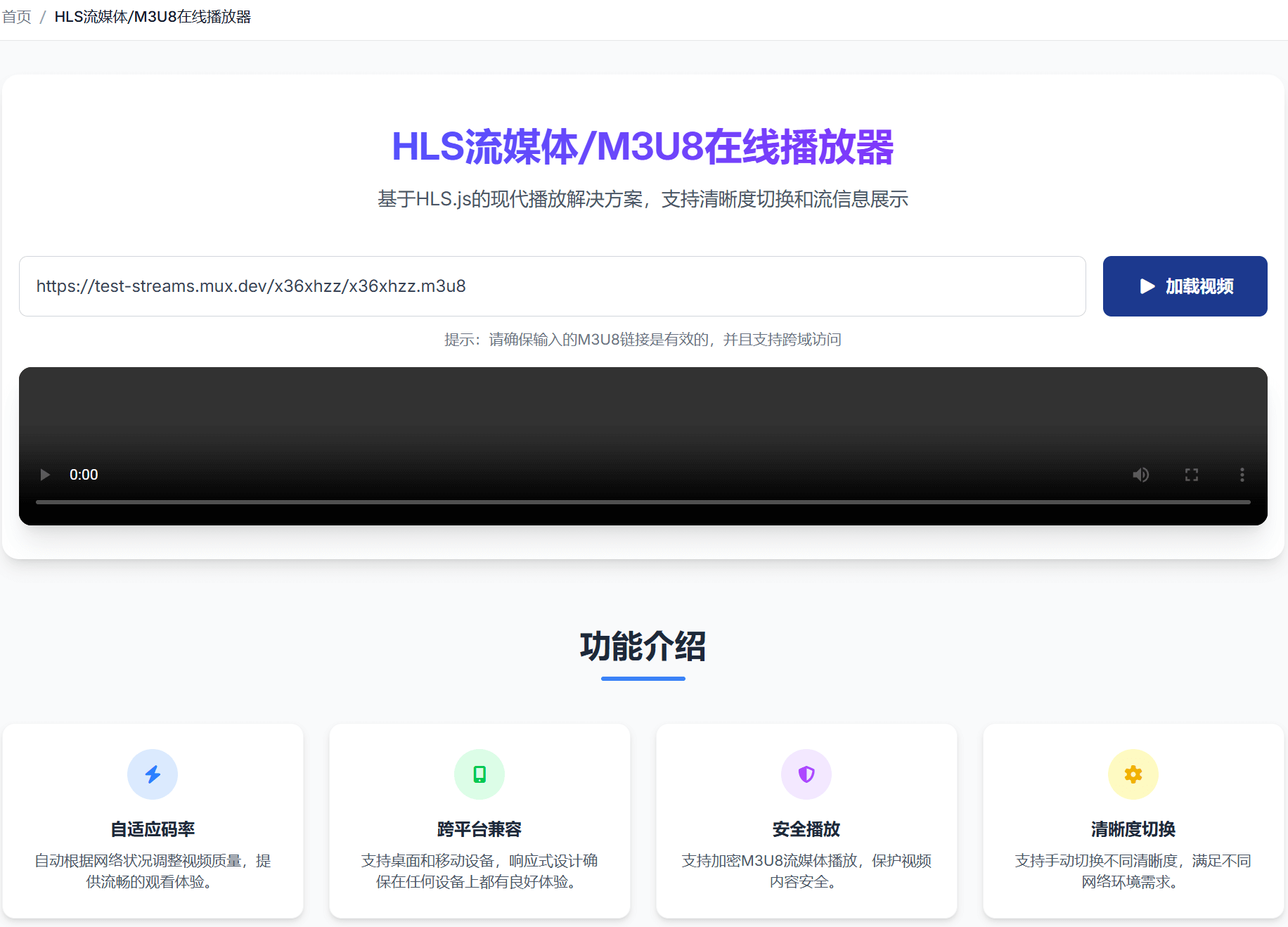
Some friends and I developed a website focused on M3U8 online playback to meet our own needs: HLS Streaming/M3U8 Online Player
The reason it's become my top choice is primarily that it solves the pain points of the above methods:
Ultimate Simplicity: Truly achieves "out-of-the-box usability." You just need to copy the M3U8 link, paste it into the website's input box, and click play. The entire process takes no more than 10 seconds—as simple as watching a regular video online.
Smooth and Stable: Extensively optimized for the M3U8 streaming protocol, with built-in intelligent buffering technology that effectively reduces lag. Even high-definition videos provide a very smooth viewing experience.
Powerful Compatibility: Supports most common encryption formats (such as AES-128). Many mysterious links that other tools can't play might successfully play here.
Bitrate Adaptive: Supports multi-bitrate switching and HLS stream information display.
Runs Entirely in Browser: No installation required, doesn't occupy computer space, and better protects your privacy and security.
How to Use?
Very simple, just three steps:
- Find and copy the M3U8 video link from the original webpage.
- Visit M3U8 Player Online
- Open the M3U8 Online Player, paste the link, and enjoy smooth playback.
If you're still troubled by watching M3U8 videos on your computer, I strongly recommend spending 10 seconds to try it—I believe it will completely change your experience.