
M3U8 to MP4 Converter
Convert M3U8/HLS streams to MP4 locally in your browser. For legitimate use only. No uploads. No installation.
This tool is for legitimate and authorized use only. It does not support DRM-protected or paid content.
Test Link: https://test-streams.mux.dev/x36xhzz/x36xhzz.m3u8
Tired of manually hunting for M3U8 URLs? Try the flowpick extension
Install the flowpick browser extension to automatically sniff network resources on any page. No more manual packet capturing — capture M3U8 URLs with one click, completely free.
Original Preview (M3U8)
Converted Preview (MP4)
How to Convert M3U8 to MP4 (3 Easy Steps)
No complicated setup. Just follow these three steps to convert M3U8 streams to MP4.
Paste the M3U8 URL
Copy your M3U8 playlist URL and paste it into the input box. Both public and encrypted streams are supported.
Tip: Try the demo link to test the converter instantly.
Select Video Quality
The system automatically detects available stream qualities and bitrates. Choose the resolution that works best for you.
Recommended: 1080p for the best viewing experience.
Start Converting
Click Convert to process the video. Progress is shown in real time, and the MP4 file will be ready to download when finished.
Enable multi-threading to significantly speed up the conversion process.
What Is an M3U8 File and How to Convert It to MP4?
Understand M3U8 streaming format's core features and key differences from MP4
M3U8 Definition
M3U8 is an HLS-based playlist file that organizes multiple TS video segments through indexing, designed specifically for streaming.
Core Advantages
Adaptive Bitrate
Auto-adapts to network conditions for optimal quality
Segmented Transmission
Small segment transmission for better stability
Encryption Support
AES-128 encryption for content protection
Usage Scenarios
- Live Streaming
- Video on Demand
- Mobile Playback
Key Differences
| Feature | M3U8 | MP4 |
|---|---|---|
| Transmission | Streaming | File Download |
| Network Adaptation | Excellent | Average |
| Playback Compatibility | Requires HLS Support | Widely Supported |
| Use Cases | Live Streaming, VOD | Local Storage |
M3U8 is designed for streaming, while MP4 is better for local playback. This tool combines the advantages of both.
Why Choose Our M3U8 to MP4 Converter?
A professional M3U8 to MP4 converter designed for fast, secure, and reliable streaming media processing.
Fast Conversion Performance
Multi-Thread Acceleration
Supports up to 10 concurrent threads to dramatically improve download speed.
Smart Optimization
Automatically selects the best stream quality to balance speed and video quality.
Batch Processing
Download and process multiple video segments efficiently in a single task.
Privacy & Security
Local Processing
All operations run locally in your browser. Your data is never uploaded to any server.
Encryption Support
Fully supports AES-128 encrypted M3U8 streams with automatic decryption.
No Registration Required
Use the tool instantly with no sign-up or login required.
Professional Features
Lossless Remux
Convert TS segments into MP4 without re-encoding, preserving the original quality.
Multiple Bitrate Support
Automatically detects and allows you to choose between different stream resolutions.
Real-Time Preview
Preview streams and compare results before and after conversion.
How M3U8 to MP4 Converter Works
Understand the core technology behind M3U8 to MP4 conversion and how the streaming process works.
Core Technology
HLS Playlist Parsing
The system parses the M3U8 playlist to extract TS segment URLs, encryption details, and stream quality options.
Multi-Thread Segment Download
Video segments are downloaded in parallel with optional AES-128 decryption to maximize efficiency.
Remux to MP4
All TS segments are remuxed into an MP4 container while preserving the original video quality without re-encoding.
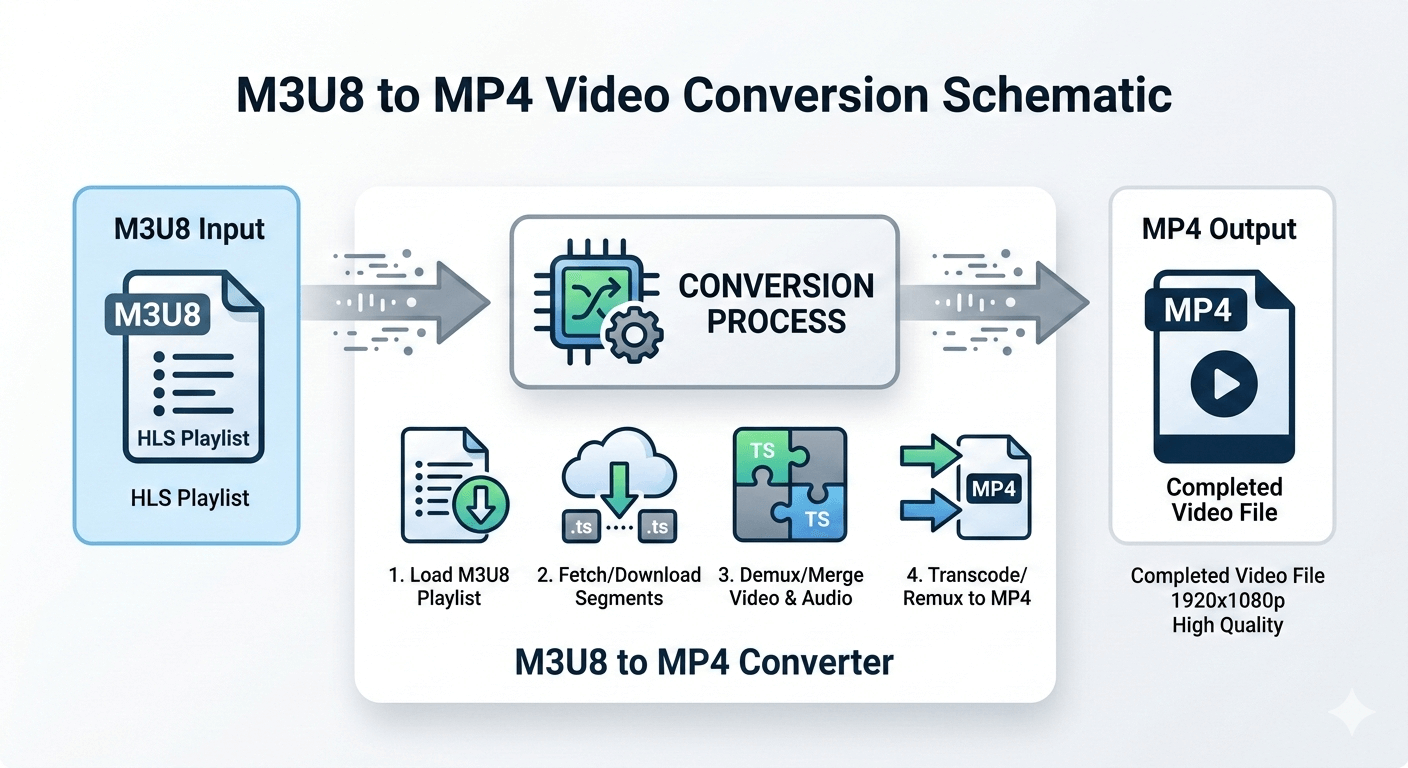
Key Features of the M3U8 to MP4 Converter
The M3U8 to MP4 converter offers a range of features to ensure smooth and efficient conversion of HLS streams to MP4 format.
Standard HLS Support
Supports standard AES-128 HLS streams with authorized access.
Local Processing
All processing runs locally in your browser. No uploads or server storage.
Fast Repackaging
Repackages segments without re-encoding for faster processing.
Multi-Quality Streams
Detects and allows selection of available stream qualities.
Use Cases for M3U8 to MP4 Conversion
M3U8 to MP4 converter is suitable for various legitimate use cases, including technical learning, personal content processing, development testing, and playback compatibility.
Technical Learning
Learn how HLS/M3U8 streaming and segment packaging work.
Personal Content
Process your own or fully authorized streaming content.
Development & Testing
Debug players, test pipelines, and verify streaming workflows.
Playback Compatibility
Convert M3U8 streams to MP4 for broader device compatibility.
M3U8 to MP4 Converter FAQ
Answers to common questions about the M3U8 to MP4 converter tool, including HLS streaming, conversion methods, and usage tips.
What is HLS streaming?
How do I convert M3U8 to MP4?
Can I use the tool on my smartphone or tablet?
Why can’t some M3U8 URLs be converted?
Does the converter support DRM-protected content?
Will my videos be uploaded or stored on your servers?
Will the video quality be reduced after conversion?
Does it support audio-only M3U8 streams?
Why does it fail more often on mobile devices?
Is this tool free? Are there any usage limits?
What Users Say About M3U8 to MP4 Converter
Real feedback from users who rely on our M3U8 to MP4 converter.
David Chen
Streaming Engineer
"As a streaming developer, I often test HLS compatibility. This tool is fast, reliable, and preserves the original video quality perfectly. It saves me a lot of time."
Sarah Miller
Online Course Creator
"Converting my course streams to MP4 allows students to watch offline easily. The process is quick and extremely simple to use."
Kevin Park
Computer Science Student
"This tool helped me understand how HLS works while studying streaming technologies. Seeing the conversion process makes the protocol much easier to learn."
Michael Roberts
Video Platform Product Manager
"We use this tool during product testing to verify video format compatibility. The interface is clean and the conversion process is very stable."
Alex Rivera
Freelance Videographer
"I often convert recorded livestream M3U8 files to MP4 for editing. The quality remains excellent with no noticeable loss."
David Chen
Streaming Engineer
"As a streaming developer, I often test HLS compatibility. This tool is fast, reliable, and preserves the original video quality perfectly. It saves me a lot of time."
Sarah Miller
Online Course Creator
"Converting my course streams to MP4 allows students to watch offline easily. The process is quick and extremely simple to use."
Kevin Park
Computer Science Student
"This tool helped me understand how HLS works while studying streaming technologies. Seeing the conversion process makes the protocol much easier to learn."
Michael Roberts
Video Platform Product Manager
"We use this tool during product testing to verify video format compatibility. The interface is clean and the conversion process is very stable."
Alex Rivera
Freelance Videographer
"I often convert recorded livestream M3U8 files to MP4 for editing. The quality remains excellent with no noticeable loss."
Related Tools
More online media processing tools
HLS / M3U8 Player
Play HLS / M3U8 streams online directly in your browser.
FLV / RTMP Player
Play FLV and RTMP live streams directly in your browser.
TS File Merger
Merge multiple ts segment files into single video file.
M3U8 Playlist Analyzer
Professional M3U8 analyzer to inspect playlists online.