
HLS.js完全ガイドとベストプラクティス:コード例とM3U8オンラインプレイヤー事例研究
これはHLS.jsの究極のガイドです。HLS.jsとは何か、その仕組みを深く解説し、最適な適用シナリオと利点・欠点を明らかにします。React/Vue.jsとの統合方法を学び、当サイトのM3U8オンラインプレイヤーから開発のインスピレーションを得られます。さらに、CORSエラー、高いライブ遅延、再生途切れなどの一般的な問題に対する実用的な解決策を、コード例とSEO最適化の提案とともに提供し、すべてのブラウザに対応したレスポンシブな動画再生体験を簡単に構築できるよう支援します。
HLS.jsとは
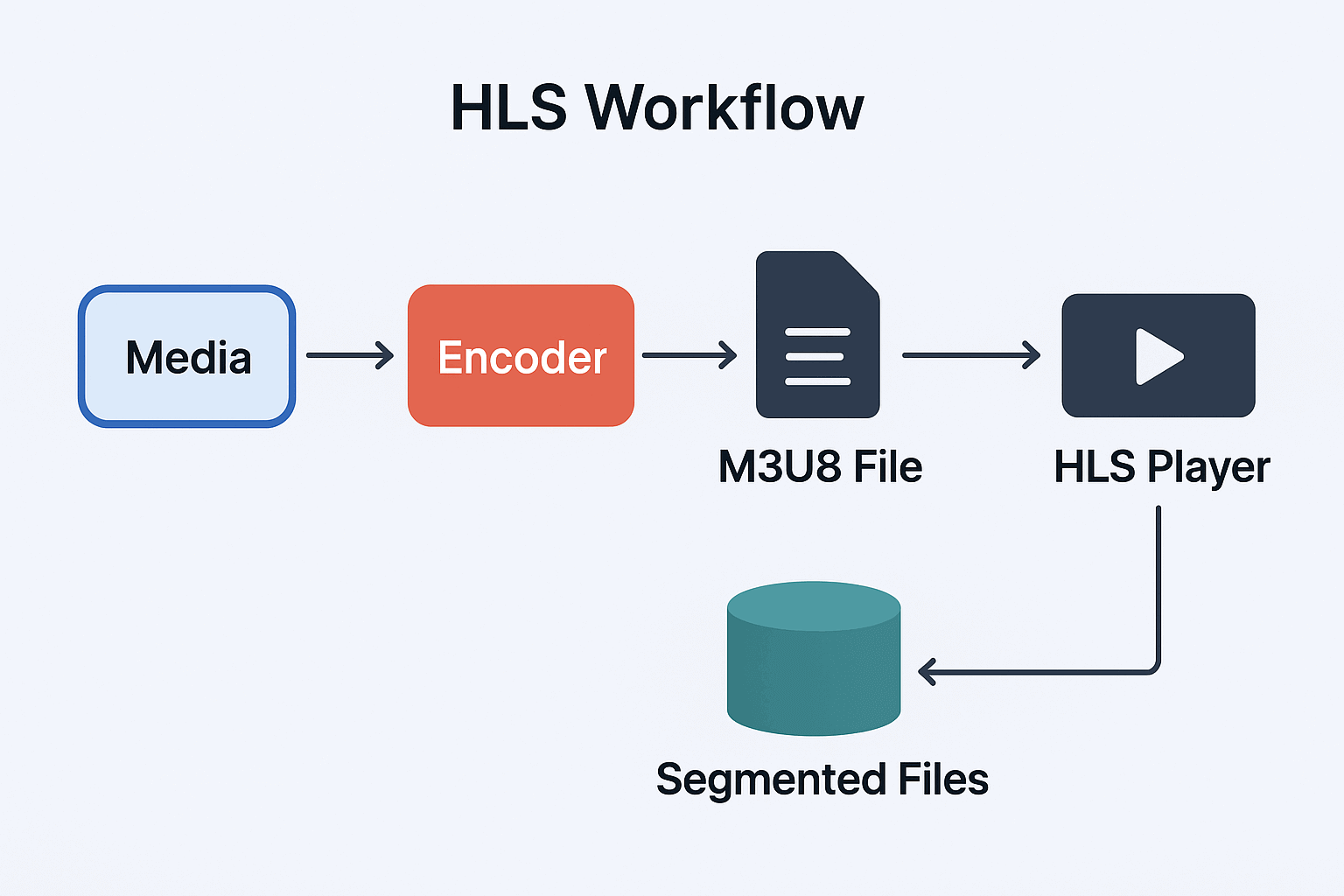
HLS(HTTP Live Streaming)はAppleが開発したHTTPベースのストリーミングメディアプロトコルです。ビデオストリーム全体を一連の小さなHTTPファイル(TSセグメント)に分割し、m3u8プレイリストファイルを通じてこれらのセグメントをインデックス化することで動作します。HLS.jsはJavaScriptで書かれたオープンソースライブラリで、Media Source ExtensionsをサポートするブラウザでプラグインなしでHLSビデオを再生できます。具体的な実装については、Githubのリポジトリを参照してください:HLS.js
// HLS.js basic usage example
if (Hls.isSupported()) {
  const video = document.getElementById('video');
  const hls = new Hls();
  hls.loadSource('https://example.com/playlist.m3u8');
  hls.attachMedia(video);
  hls.on(Hls.Events.MANIFEST_PARSED, function() {
    video.play();
  });
}
HLS.jsプロトコルの基本原理
HLS(HTTP Live Streaming)プロトコルの基本原理は、ビデオストリームを小さなTS(Transport Stream)ファイルセグメントに分割し、M3U8インデックスファイルを通じてこれらのセグメントを整理することです。この設計により、ビデオ再生は異なるネットワーク条件に適応し、アダプティブビットレート切り替えを実現できます。
HLS File Structure Example
#EXTM3U
#EXT-X-VERSION:3
#EXT-X-TARGETDURATION:10
#EXT-X-MEDIA-SEQUENCE:0
#EXT-X-PLAYLIST-TYPE:VOD
#EXTINF:10.0,
segment0.ts
#EXTINF:10.0,
segment1.ts
#EXTINF:10.0,
segment2.ts
#EXT-X-ENDLIST
HLSの利点と欠点
利点
広範な互換性:ほぼすべての最新デバイス(iOS、Android、デスクトップブラウザを含む)がHLSをサポート
ファイアウォールフレンドリー:標準HTTPポートを使用し、ファイアウォールの問題を回避
アダプティブストリーミング:ネットワーク条件に自動的に適応し、最適な視聴体験を提供
コンテンツ保護:AES-128暗号化とDRM統合をサポート
CDN配信が容易:既存のHTTP CDNインフラストラクチャを活用可能
欠点
高い遅延:WebRTCなどのプロトコルと比較して、HLSの遅延は通常高い(通常10-30秒)
ファイルの断片化:多くの小さなファイルを生成し、ストレージと管理の複雑さが増す可能性
エンコーディングの複雑さ:複数の品質バージョンのビデオを準備する必要がある
HLSの最適な使用シナリオ
1. クロスプラットフォームライブストリーミング
HLSはライブストリーミングアプリケーションの理想的な選択肢であり、特に複数のデバイスとプラットフォームをカバーする必要がある場合に適しています。HLSはHTTPプロトコルに基づいているため、ファイアウォールやプロキシサーバーを簡単に通過でき、RTMPなどの従来のプロトコルでは実現が難しい機能です。
2. アダプティブビットレートストリーミング
HLSはアダプティブビットレート(ABR)ストリーミングをサポートしており、プレイヤーはユーザーのネットワーク条件に基づいて最も適切なビデオ品質を自動的に選択できます。この機能は、スムーズな視聴体験を提供するために重要です。
以下はアダプティブビットレート切り替えのデモです:
// Monitor HLS.js level switch events
hls.on(Hls.Events.LEVEL_SWITCHED, function(event, data) {
  console.log(`Switched to level ${data.level}, bitrate: ${hls.levels[data.level].bitrate}`);
});
3. 大規模コンテンツ配信
HLSは標準的なHTTPサーバーとCDNを使用するため、WowzaやIISなどの専用ストリーミングサーバーインフラストラクチャなしで、数百万の視聴者に簡単にスケールできます。
実際のプロジェクトでの統合
以下はReactプロジェクトでHLS.jsを統合する例です:
React Integration Example
import React, { useRef, useEffect, useState } from 'react';
import Hls from 'hls.js';

const VideoPlayer = ({ source, config = {} }) => {
  const videoRef = useRef(null);
  const hlsRef = useRef(null);
  const [playerState, setPlayerState] = useState({
    isPlaying: false,
    currentTime: 0,
    duration: 0,
    volume: 1,
    qualityLevels: [],
    currentQuality: 0,
    buffering: false
  });

  useEffect(() => {
    const video = videoRef.current;
    if (!video) return;

    const initializePlayer = () => {
      if (Hls.isSupported()) {
        const hls = new Hls({
          enableWorker: true,
          lowLatencyMode: true,
          backBufferLength: 90,
          ...config
        });

        hlsRef.current = hls;

        // Set up event listeners
        setupHlsEvents(hls);

        hls.loadSource(source);
        hls.attachMedia(video);
      } else if (video.canPlayType('application/vnd.apple.mpegurl')) {
        video.src = source;
      }
    };

    const setupHlsEvents = (hls) => {
      hls.on(Hls.Events.MEDIA_ATTACHED, () => {
        console.log('Video media attached');
      });

      hls.on(Hls.Events.MANIFEST_PARSED, (event, data) => {
        console.log('Playlist parsed', data);
        setPlayerState(prev => ({
          ...prev,
          qualityLevels: data.levels,
          duration: video.duration
        }));
      });

      hls.on(Hls.Events.LEVEL_LOADED, (event, data) => {
        console.log('Quality level loaded:', data);
      });

      hls.on(Hls.Events.LEVEL_SWITCHED, (event, data) => {
        setPlayerState(prev => ({
          ...prev,
          currentQuality: data.level
        }));
      });

      hls.on(Hls.Events.ERROR, (event, data) => {
        console.error('HLS error:', data);
        handleHlsError(data);
      });
    };

    const handleHlsError = (data) => {
      if (data.fatal) {
        switch (data.type) {
          case Hls.ErrorTypes.NETWORK_ERROR:
            console.log('Network error, attempting to reload...');
            hlsRef.current.startLoad();
            break;
          case Hls.ErrorTypes.MEDIA_ERROR:
            console.log('Media error, attempting to recover...');
            hlsRef.current.recoverMediaError();
            break;
          default:
            console.log('Unrecoverable error, destroying instance');
            hlsRef.current.destroy();
            break;
        }
      }
    };

    initializePlayer();

    return () => {
      if (hlsRef.current) {
        hlsRef.current.destroy();
      }
    };
  }, [source, config]);

  const handlePlayPause = () => {
    const video = videoRef.current;
    if (playerState.isPlaying) {
      video.pause();
    } else {
      video.play();
    }
    setPlayerState(prev => ({ ...prev, isPlaying: !prev.isPlaying }));
  };

  const changeQuality = (level) => {
    if (hlsRef.current) {
      hlsRef.current.currentLevel = level;
      setPlayerState(prev => ({ ...prev, currentQuality: level }));
    }
  };

  return (
    <div className="video-player">
      <video
        ref={videoRef}
        className="video-element"
        controls={false}
        onTimeUpdate={() => setPlayerState(prev => ({
          ...prev,
          currentTime: videoRef.current.currentTime
        }))}
      />

      <div className="player-controls">
        <button onClick={handlePlayPause}>
          {playerState.isPlaying ? 'Pause' : 'Play'}
        </button>

        <div className="quality-selector">
          <label>Quality: </label>
          <select
            value={playerState.currentQuality}
            onChange={(e) => changeQuality(parseInt(e.target.value))}
          >
            {playerState.qualityLevels.map((level, index) => (
              <option key={index} value={index}>
                {Math.round(level.bitrate / 1000)} kbps
              </option>
            ))}
          </select>
        </div>

        <div className="time-display">
          {formatTime(playerState.currentTime)} / {formatTime(playerState.duration)}
        </div>
      </div>
    </div>
  );
};

const formatTime = (seconds) => {
  if (!seconds) return '00:00';
  const mins = Math.floor(seconds / 60);
  const secs = Math.floor(seconds % 60);
  return `${mins.toString().padStart(2, '0')}:${secs.toString().padStart(2, '0')}`;
};

export default VideoPlayer;
Vue.js Integration Example
This example uses Vue3 and HLS.js. The HLS / M3U8 Player provided by this site is implemented based on the following example.
<template>
  <div class="video-player">
    <video
      ref="videoElement"
      class="video-element"
      @timeupdate="onTimeUpdate"
      @waiting="onBuffering"
      @canplay="onCanPlay"
    ></video>

    <div class="player-controls">
      <button @click="togglePlay">
        {{ isPlaying ? 'Pause' : 'Play' }}
      </button>

      <select v-model="currentQuality" @change="changeQuality">
        <option
          v-for="(level, index) in qualityLevels"
          :key="index"
          :value="index"
        >
          {{ Math.round(level.bitrate / 1000) }} kbps
        </option>
      </select>

      <div class="progress">
        <span>{{ formatTime(currentTime) }}</span>
        <input
          type="range"
          :max="duration"
          :value="currentTime"
          @input="seekTo"
          class="progress-bar"
        >
        <span>{{ formatTime(duration) }}</span>
      </div>
    </div>

    <div v-if="buffering" class="buffering-indicator">
      Buffering...
    </div>
  </div>
</template>

<script>
import Hls from 'hls.js';

export default {
  name: 'HlsVideoPlayer',
  props: {
    source: {
      type: String,
      required: true
    },
    config: {
      type: Object,
      default: () => ({})
    }
  },
  data() {
    return {
      hls: null,
      isPlaying: false,
      currentTime: 0,
      duration: 0,
      currentQuality: -1,
      qualityLevels: [],
      buffering: false
    };
  },
  mounted() {
    this.initializePlayer();
  },
  beforeUnmount() {
    this.destroyPlayer();
  },
  methods: {
    initializePlayer() {
      const video = this.$refs.videoElement;

      if (Hls.isSupported()) {
        this.hls = new Hls({
          enableWorker: true,
          lowLatencyMode: true,
          ...this.config
        });

        this.setupHlsEvents();
        this.hls.loadSource(this.source);
        this.hls.attachMedia(video);
      } else if (video.canPlayType('application/vnd.apple.mpegurl')) {
        video.src = this.source;
      }
    },

    setupHlsEvents() {
      this.hls.on(Hls.Events.MANIFEST_PARSED, (event, data) => {
        this.qualityLevels = data.levels;
        this.duration = this.$refs.videoElement.duration;
      });

      this.hls.on(Hls.Events.LEVEL_SWITCHED, (event, data) => {
        this.currentQuality = data.level;
      });

      this.hls.on(Hls.Events.ERROR, (event, data) => {
        this.handleHlsError(data);
      });
    },

    handleHlsError(data) {
      console.error('HLS error:', data);
      if (data.fatal) {
        switch (data.type) {
          case Hls.ErrorTypes.NETWORK_ERROR:
            this.hls.startLoad();
            break;
          case Hls.ErrorTypes.MEDIA_ERROR:
            this.hls.recoverMediaError();
            break;
          default:
            this.hls.destroy();
            break;
        }
      }
    },

    togglePlay() {
      const video = this.$refs.videoElement;
      if (this.isPlaying) {
        video.pause();
      } else {
        video.play();
      }
      this.isPlaying = !this.isPlaying;
    },

    changeQuality(event) {
      const level = parseInt(event.target.value);
      if (this.hls) {
        this.hls.currentLevel = level;
      }
    },

    seekTo(event) {
      const time = parseFloat(event.target.value);
      this.$refs.videoElement.currentTime = time;
      this.currentTime = time;
    },

    onTimeUpdate() {
      this.currentTime = this.$refs.videoElement.currentTime;
    },

    onBuffering() {
      this.buffering = true;
    },

    onCanPlay() {
      this.buffering = false;
    },

    formatTime(seconds) {
      if (!seconds) return '00:00';
      const mins = Math.floor(seconds / 60);
      const secs = Math.floor(seconds % 60);
      return `${mins.toString().padStart(2, '0')}:${secs.toString().padStart(2, '0')}`;
    },

    destroyPlayer() {
      if (this.hls) {
        this.hls.destroy();
      }
    }
  }
};
</script>

<style scoped>
.video-player {
  position: relative;
  max-width: 800px;
}

.video-element {
  width: 100%;
  background: #000;
}

.player-controls {
  display: flex;
  align-items: center;
  gap: 10px;
  padding: 10px;
  background: #f5f5f5;
}

.progress {
  display: flex;
  align-items: center;
  flex-grow: 1;
  gap: 10px;
}

.progress-bar {
  flex-grow: 1;
}

.buffering-indicator {
  position: absolute;
  top: 50%;
  left: 50%;
  transform: translate(-50%, -50%);
  background: rgba(0, 0, 0, 0.7);
  color: white;
  padding: 10px 20px;
  border-radius: 5px;
}
</style>
高度な機能とベストプラクティス
- リアルタイム監視と統計
class HlsMonitor {
  constructor(hlsInstance) {
    this.hls = hlsInstance;
    this.stats = {
      bandwidth: 0,
      buffering: 0,
      qualitySwitches: 0,
      errors: 0
    };

    this.setupMonitoring();
  }

  setupMonitoring() {
    // Monitor bandwidth changes
    this.hls.on(Hls.Events.FRAG_LOADED, (event, data) => {
      this.updateBandwidthStats(data);
    });

    // Monitor buffering status
    this.hls.on(Hls.Events.BUFFER_CREATED, () => {
      this.stats.buffering++;
    });

    // Monitor quality switches
    this.hls.on(Hls.Events.LEVEL_SWITCHED, () => {
      this.stats.qualitySwitches++;
    });

    // Error monitoring
    this.hls.on(Hls.Events.ERROR, () => {
      this.stats.errors++;
    });
  }

  updateBandwidthStats(data) {
    const stats = data.stats;
    const loadTime = stats.loading.end - stats.loading.first;
    const bytesLoaded = stats.loaded;

    if (loadTime > 0) {
      this.stats.bandwidth = Math.round((bytesLoaded * 8) / (loadTime / 1000));
    }
  }

  getPerformanceReport() {
    return {
      ...this.stats,
      currentLevel: this.hls.currentLevel,
      levels: this.hls.levels,
      loadLevel: this.hls.loadLevel,
      nextLoadLevel: this.hls.nextLoadLevel
    };
  }
}- オフライン再生サポート
// Service Workerを使用してHLSセグメントをキャッシュ
class HlsCacheManager {
  constructor() {
    this.cacheName = 'hls-cache-v1';
    this.initCache();
  }

  async initCache() {
    if ('serviceWorker' in navigator && 'caches' in window) {
      await this.registerServiceWorker();
    }
  }

  async registerServiceWorker() {
    const registration = await navigator.serviceWorker.register('/sw.js');

    navigator.serviceWorker.addEventListener('message', event => {
      if (event.data.type === 'CACHE_STATUS') {
        console.log('Cache status:', event.data.status);
      }
    });
  }

  async cacheSegment(url, data) {
    try {
      const cache = await caches.open(this.cacheName);
      const response = new Response(data, {
        headers: { 'Content-Type': 'video/MP2T' }
      });
      await cache.put(url, response);
    } catch (error) {
      console.error('Failed to cache segment:', error);
    }
  }
}- DRM統合
// Widevine DRM統合の例
class HlsDrmManager {
  constructor(videoElement) {
    this.video = videoElement;
    this.setupDrm();
  }

  async setupDrm() {
    if (!this.video.mediaKeys) {
      await this.initializeMediaKeys();
    }
  }

  async initializeMediaKeys() {
    try {
      const config = [{
        initDataTypes: ['cenc'],
        videoCapabilities: [{
          contentType: 'video/mp4;codecs="avc1.42E01E"'
        }]
      }];

      const access = await navigator.requestMediaKeySystemAccess(
        'com.widevine.alpha',
        config
      );

      const mediaKeys = await access.createMediaKeys();
      await this.video.setMediaKeys(mediaKeys);

      this.setupSessionHandling();
    } catch (error) {
      console.error('DRM initialization failed:', error);
    }
  }

  setupSessionHandling() {
    this.video.addEventListener('encrypted', (event) => {
      this.handleEncryptedEvent(event);
    });
  }

  async handleEncryptedEvent(event) {
    const session = this.video.mediaKeys.createSession();
    await session.generateRequest(event.initDataType, event.initData);

    // Fetch license
    const license = await this.fetchLicense(session);
    await session.update(license);
  }

  async fetchLicense(session) {
    // Implement license fetching logic
    const response = await fetch('/drm/license', {
      method: 'POST',
      body: session.getLicenseRequest()
    });
    return await response.arrayBuffer();
  }
}
Performance Optimization and Debugging Tips
- Performance Monitoring Panel
class HlsDebugPanel {
  constructor(hlsInstance, container) {
    this.hls = hlsInstance;
    this.container = container;
    this.monitor = new HlsMonitor(hlsInstance);

    this.createDebugPanel();
    this.startMonitoring();
  }

  createDebugPanel() {
    this.panel = document.createElement('div');
    this.panel.style.cssText = `
      position: fixed;
      top: 10px;
      right: 10px;
      background: rgba(0,0,0,0.8);
      color: white;
      padding: 10px;
      font-family: monospace;
      font-size: 12px;
      z-index: 1000;
      max-width: 300px;
    `;

    this.container.appendChild(this.panel);
  }

  startMonitoring() {
    setInterval(() => {
      this.updatePanel();
    }, 1000);
  }

  updatePanel() {
    const report = this.monitor.getPerformanceReport();
    const levels = report.levels || [];
    const currentLevel = levels[report.currentLevel] || {};

    this.panel.innerHTML = `
      <div><strong>HLS.js Debug Panel</strong></div>
      <div>Bandwidth: ${(report.bandwidth / 1000000).toFixed(2)} Mbps</div>
      <div>Current Quality: ${currentLevel.bitrate ? Math.round(currentLevel.bitrate / 1000) + ' kbps' : 'N/A'}</div>
      <div>Quality Switches: ${report.qualitySwitches} times</div>
      <div>Buffering Events: ${report.buffering} times</div>
      <div>Error Count: ${report.errors}</div>
      <div>Available Quality Levels: ${levels.length}</div>
    `;
  }
}
Common Issues and Solutions in HLS Usage
1. How to Handle CORS Issues?
If the backend has set up cross-origin validation, HLS.js needs to correctly configure CORS headers when loading cross-origin resources. Refer to the following demo example:
// Configure CORS when creating Hls instance
const hls = new Hls({
  xhrSetup: function(xhr, url) {
    xhr.withCredentials = true; // If credentials need to be sent
  }
});
Server response needs to include appropriate CORS headers:
Access-Control-Allow-Origin: *
Access-Control-Allow-Methods: GET, HEAD, OPTIONS
Access-Control-Expose-Headers: Content-Length, Content-Range
2. How to Optimize Startup Time?
Key strategies to reduce startup time. Refer to the following demo example:
// Configure HLS.js to optimize startup performance
const hls = new Hls({
  enableWorker: true, // Use Web Worker to improve performance
  lowLatencyMode: true, // Enable low-latency mode
  backBufferLength: 90, // Set appropriate buffer length
  maxBufferLength: 30,
  maxMaxBufferLength: 600,
  maxBufferSize: 60 * 1000 * 1000, // 60MB
  maxBufferHole: 0.5,
});
3. How to Handle Playback Errors?
During development, you can add error handling logic, such as listening to error events and providing friendly prompts to users. Refer to the demo example below:
hls.on(Hls.Events.ERROR, function(event, data) {
  console.error('Playback error:', data);

  if (data.fatal) {
    switch(data.type) {
      case Hls.ErrorTypes.NETWORK_ERROR:
        console.log('Network error, attempting to recover...');
        hls.startLoad();
        break;
      case Hls.ErrorTypes.MEDIA_ERROR:
        console.log('Media error, attempting to recover...');
        hls.recoverMediaError();
        break;
      default:
        console.log('Unrecoverable error');
        hls.destroy();
        break;
    }
  }
});
4. How to Implement Low-Latency HLS?
For scenarios requiring lower latency, you can configure HLS settings, such as reducing sync duration and latency time. Refer to the configuration below:
// Configure low-latency HLS
const hls = new Hls({
  lowLatencyMode: true,
  backBufferLength: 90,
  liveSyncDurationCount: 3, // Reduce sync duration
  liveMaxLatencyDurationCount: 10, // Control maximum latency
});
Additionally, the server side needs corresponding configuration:
Use shorter segment duration (2-4 seconds)
Enable LL-HLS (Low-Latency HLS) features
Summary
HLS.js is a powerful and highly customizable streaming media playback solution. By deeply understanding its architecture and configuration options, developers can build high-performance video playback applications adapted to various scenarios. Key points include:
Reasonable Configuration: Adjust parameters such as buffer size and network timeout based on application scenarios
Error Handling: Implement comprehensive error recovery mechanisms to improve user experience
Performance Monitoring: Real-time monitoring of playback status to promptly discover issues
Framework Integration: Deep integration with modern frontend frameworks to provide componentized solutions
Advanced Features: Fully utilize advanced features like DRM and offline caching
Through the in-depth analysis and practical application techniques introduced in this article, developers can better master HLS.js and build professional-grade streaming media playback applications.