
HLS.js Complete Guide and Best Practices, with Code Examples and M3U8 Online Player Case Study
This is the ultimate guide to HLS.js, deeply explaining what HLS.js is and how it works, elucidating its best application scenarios and pros/cons. You will learn how React/Vue.js integrates with HLS.js, and find development inspiration through our site's M3U8 online player. Additionally, we provide practical solutions for common issues like CORS errors, high live latency, and playback stuttering, complete with code examples and SEO optimization suggestions, helping you easily build responsive video playback experiences compatible with all browsers.
What is HLS.js
HLS (HTTP Live Streaming) is an HTTP-based streaming media protocol developed by Apple. It works by splitting the entire video stream into a series of small HTTP files (TS segments) and indexing these segments through an m3u8 playlist file. HLS.js is an open source library written in JavaScript that allows playing HLS videos in browsers that support Media Source Extensions without any plugins. For specific implementation, refer to the repository on Github: HLS.js
// HLS.js basic usage example
if (Hls.isSupported()) {
  const video = document.getElementById('video');
  const hls = new Hls();
  hls.loadSource('https://example.com/playlist.m3u8');
  hls.attachMedia(video);
  hls.on(Hls.Events.MANIFEST_PARSED, function() {
    video.play();
  });
}
Core Principles of HLS.js Protocol
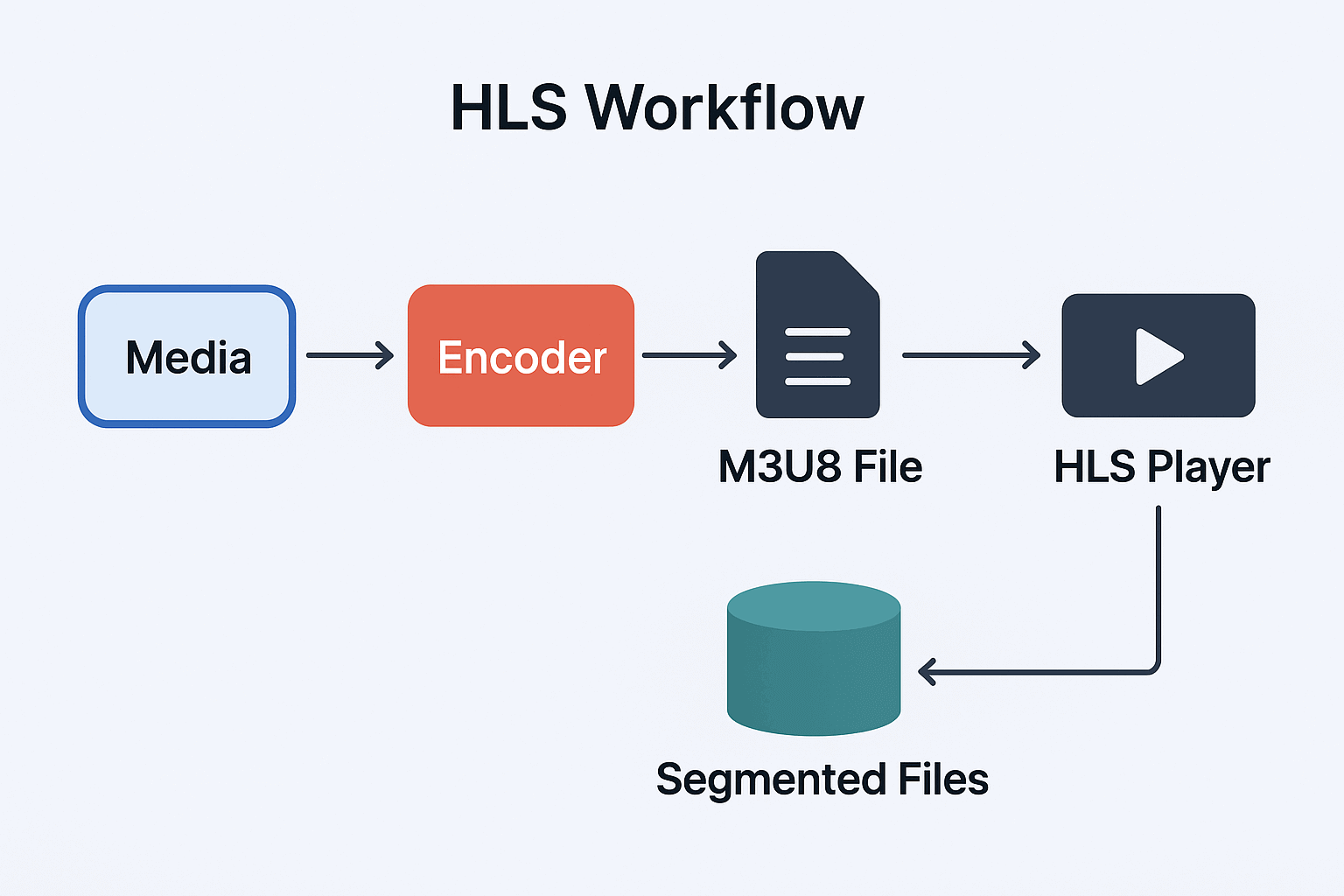
The core principle of the HLS (HTTP Live Streaming) protocol is to split the video stream into small TS (Transport Stream) file segments and organize these segments through M3U8 index files. This design enables video playback to adapt to different network conditions, achieving adaptive bitrate switching.
HLS File Structure Example
#EXTM3U
#EXT-X-VERSION:3
#EXT-X-TARGETDURATION:10
#EXT-X-MEDIA-SEQUENCE:0
#EXT-X-PLAYLIST-TYPE:VOD
#EXTINF:10.0,
segment0.ts
#EXTINF:10.0,
segment1.ts
#EXTINF:10.0,
segment2.ts
#EXT-X-ENDLIST
Pros and Cons of HLS
Advantages
Wide Compatibility: Almost all modern devices (including iOS, Android, desktop browsers) support HLS
Firewall Friendly: Uses standard HTTP ports, avoiding firewall issues
Adaptive Streaming: Automatically adapts to network conditions, providing best viewing experience
Content Protection: Supports AES-128 encryption and DRM integration
Easy CDN Distribution: Can leverage existing HTTP CDN infrastructure
Disadvantages
Higher Latency: Compared to protocols like WebRTC, HLS latency is typically higher (usually 10-30 seconds)
File Fragmentation: Generates many small files, potentially increasing storage and management complexity
Encoding Complexity: Requires preparing multiple quality versions of video
Best Use Cases for HLS
1. Cross-Platform Live Streaming
HLS is an ideal choice for live streaming applications, especially when needing to cover multiple devices and platforms. Since HLS is based on HTTP protocol, it can easily traverse firewalls and proxy servers, which is difficult for traditional protocols like RTMP to achieve.
2. Adaptive Bitrate Streaming
HLS supports Adaptive Bitrate (ABR) streaming, which means the player can automatically select the most appropriate video quality based on the user's network conditions. This capability is crucial for providing a smooth viewing experience.
Here is an adaptive bitrate switching demo:
// Monitor HLS.js level switch events
hls.on(Hls.Events.LEVEL_SWITCHED, function(event, data) {
  console.log(`Switched to level ${data.level}, bitrate: ${hls.levels[data.level].bitrate}`);
});
3. Large-Scale Content Distribution
Since HLS uses standard HTTP servers and CDNs, it can easily scale to millions of viewers without dedicated streaming server infrastructure like Wowza or IIS.
Integration in Real Projects
Here's an example of integrating HLS.js in a React project:
React Integration Example
import React, { useRef, useEffect, useState } from 'react';
import Hls from 'hls.js';

const VideoPlayer = ({ source, config = {} }) => {
  const videoRef = useRef(null);
  const hlsRef = useRef(null);
  const [playerState, setPlayerState] = useState({
    isPlaying: false,
    currentTime: 0,
    duration: 0,
    volume: 1,
    qualityLevels: [],
    currentQuality: 0,
    buffering: false
  });

  useEffect(() => {
    const video = videoRef.current;
    if (!video) return;

    const initializePlayer = () => {
      if (Hls.isSupported()) {
        const hls = new Hls({
          enableWorker: true,
          lowLatencyMode: true,
          backBufferLength: 90,
          ...config
        });

        hlsRef.current = hls;

        // Set up event listeners
        setupHlsEvents(hls);

        hls.loadSource(source);
        hls.attachMedia(video);
      } else if (video.canPlayType('application/vnd.apple.mpegurl')) {
        video.src = source;
      }
    };

    const setupHlsEvents = (hls) => {
      hls.on(Hls.Events.MEDIA_ATTACHED, () => {
        console.log('Video media attached');
      });

      hls.on(Hls.Events.MANIFEST_PARSED, (event, data) => {
        console.log('Playlist parsed', data);
        setPlayerState(prev => ({
          ...prev,
          qualityLevels: data.levels,
          duration: video.duration
        }));
      });

      hls.on(Hls.Events.LEVEL_LOADED, (event, data) => {
        console.log('Quality level loaded:', data);
      });

      hls.on(Hls.Events.LEVEL_SWITCHED, (event, data) => {
        setPlayerState(prev => ({
          ...prev,
          currentQuality: data.level
        }));
      });

      hls.on(Hls.Events.ERROR, (event, data) => {
        console.error('HLS error:', data);
        handleHlsError(data);
      });
    };

    const handleHlsError = (data) => {
      if (data.fatal) {
        switch (data.type) {
          case Hls.ErrorTypes.NETWORK_ERROR:
            console.log('Network error, attempting to reload...');
            hlsRef.current.startLoad();
            break;
          case Hls.ErrorTypes.MEDIA_ERROR:
            console.log('Media error, attempting to recover...');
            hlsRef.current.recoverMediaError();
            break;
          default:
            console.log('Unrecoverable error, destroying instance');
            hlsRef.current.destroy();
            break;
        }
      }
    };

    initializePlayer();

    return () => {
      if (hlsRef.current) {
        hlsRef.current.destroy();
      }
    };
  }, [source, config]);

  const handlePlayPause = () => {
    const video = videoRef.current;
    if (playerState.isPlaying) {
      video.pause();
    } else {
      video.play();
    }
    setPlayerState(prev => ({ ...prev, isPlaying: !prev.isPlaying }));
  };

  const changeQuality = (level) => {
    if (hlsRef.current) {
      hlsRef.current.currentLevel = level;
      setPlayerState(prev => ({ ...prev, currentQuality: level }));
    }
  };

  return (
    <div className="video-player">
      <video
        ref={videoRef}
        className="video-element"
        controls={false}
        onTimeUpdate={() => setPlayerState(prev => ({
          ...prev,
          currentTime: videoRef.current.currentTime
        }))}
      />

      <div className="player-controls">
        <button onClick={handlePlayPause}>
          {playerState.isPlaying ? 'Pause' : 'Play'}
        </button>

        <div className="quality-selector">
          <label>Quality: </label>
          <select
            value={playerState.currentQuality}
            onChange={(e) => changeQuality(parseInt(e.target.value))}
          >
            {playerState.qualityLevels.map((level, index) => (
              <option key={index} value={index}>
                {Math.round(level.bitrate / 1000)} kbps
              </option>
            ))}
          </select>
        </div>

        <div className="time-display">
          {formatTime(playerState.currentTime)} / {formatTime(playerState.duration)}
        </div>
      </div>
    </div>
  );
};

const formatTime = (seconds) => {
  if (!seconds) return '00:00';
  const mins = Math.floor(seconds / 60);
  const secs = Math.floor(seconds % 60);
  return `${mins.toString().padStart(2, '0')}:${secs.toString().padStart(2, '0')}`;
};

export default VideoPlayer;
Vue.js Integration Example
This example uses Vue3 and HLS.js. The HLS / M3U8 Player provided by this site is implemented based on the following example.
<template>
  <div class="video-player">
    <video
      ref="videoElement"
      class="video-element"
      @timeupdate="onTimeUpdate"
      @waiting="onBuffering"
      @canplay="onCanPlay"
    ></video>

    <div class="player-controls">
      <button @click="togglePlay">
        {{ isPlaying ? 'Pause' : 'Play' }}
      </button>

      <select v-model="currentQuality" @change="changeQuality">
        <option
          v-for="(level, index) in qualityLevels"
          :key="index"
          :value="index"
        >
          {{ Math.round(level.bitrate / 1000) }} kbps
        </option>
      </select>

      <div class="progress">
        <span>{{ formatTime(currentTime) }}</span>
        <input
          type="range"
          :max="duration"
          :value="currentTime"
          @input="seekTo"
          class="progress-bar"
        >
        <span>{{ formatTime(duration) }}</span>
      </div>
    </div>

    <div v-if="buffering" class="buffering-indicator">
      Buffering...
    </div>
  </div>
</template>

<script>
import Hls from 'hls.js';

export default {
  name: 'HlsVideoPlayer',
  props: {
    source: {
      type: String,
      required: true
    },
    config: {
      type: Object,
      default: () => ({})
    }
  },
  data() {
    return {
      hls: null,
      isPlaying: false,
      currentTime: 0,
      duration: 0,
      currentQuality: -1,
      qualityLevels: [],
      buffering: false
    };
  },
  mounted() {
    this.initializePlayer();
  },
  beforeUnmount() {
    this.destroyPlayer();
  },
  methods: {
    initializePlayer() {
      const video = this.$refs.videoElement;

      if (Hls.isSupported()) {
        this.hls = new Hls({
          enableWorker: true,
          lowLatencyMode: true,
          ...this.config
        });

        this.setupHlsEvents();
        this.hls.loadSource(this.source);
        this.hls.attachMedia(video);
      } else if (video.canPlayType('application/vnd.apple.mpegurl')) {
        video.src = this.source;
      }
    },

    setupHlsEvents() {
      this.hls.on(Hls.Events.MANIFEST_PARSED, (event, data) => {
        this.qualityLevels = data.levels;
        this.duration = this.$refs.videoElement.duration;
      });

      this.hls.on(Hls.Events.LEVEL_SWITCHED, (event, data) => {
        this.currentQuality = data.level;
      });

      this.hls.on(Hls.Events.ERROR, (event, data) => {
        this.handleHlsError(data);
      });
    },

    handleHlsError(data) {
      console.error('HLS error:', data);
      if (data.fatal) {
        switch (data.type) {
          case Hls.ErrorTypes.NETWORK_ERROR:
            this.hls.startLoad();
            break;
          case Hls.ErrorTypes.MEDIA_ERROR:
            this.hls.recoverMediaError();
            break;
          default:
            this.hls.destroy();
            break;
        }
      }
    },

    togglePlay() {
      const video = this.$refs.videoElement;
      if (this.isPlaying) {
        video.pause();
      } else {
        video.play();
      }
      this.isPlaying = !this.isPlaying;
    },

    changeQuality(event) {
      const level = parseInt(event.target.value);
      if (this.hls) {
        this.hls.currentLevel = level;
      }
    },

    seekTo(event) {
      const time = parseFloat(event.target.value);
      this.$refs.videoElement.currentTime = time;
      this.currentTime = time;
    },

    onTimeUpdate() {
      this.currentTime = this.$refs.videoElement.currentTime;
    },

    onBuffering() {
      this.buffering = true;
    },

    onCanPlay() {
      this.buffering = false;
    },

    formatTime(seconds) {
      if (!seconds) return '00:00';
      const mins = Math.floor(seconds / 60);
      const secs = Math.floor(seconds % 60);
      return `${mins.toString().padStart(2, '0')}:${secs.toString().padStart(2, '0')}`;
    },

    destroyPlayer() {
      if (this.hls) {
        this.hls.destroy();
      }
    }
  }
};
</script>

<style scoped>
.video-player {
  position: relative;
  max-width: 800px;
}

.video-element {
  width: 100%;
  background: #000;
}

.player-controls {
  display: flex;
  align-items: center;
  gap: 10px;
  padding: 10px;
  background: #f5f5f5;
}

.progress {
  display: flex;
  align-items: center;
  flex-grow: 1;
  gap: 10px;
}

.progress-bar {
  flex-grow: 1;
}

.buffering-indicator {
  position: absolute;
  top: 50%;
  left: 50%;
  transform: translate(-50%, -50%);
  background: rgba(0, 0, 0, 0.7);
  color: white;
  padding: 10px 20px;
  border-radius: 5px;
}
</style>
Advanced Features and Best Practices
- Real-time Monitoring and Statistics
class HlsMonitor {
  constructor(hlsInstance) {
    this.hls = hlsInstance;
    this.stats = {
      bandwidth: 0,
      buffering: 0,
      qualitySwitches: 0,
      errors: 0
    };

    this.setupMonitoring();
  }

  setupMonitoring() {
    // Monitor bandwidth changes
    this.hls.on(Hls.Events.FRAG_LOADED, (event, data) => {
      this.updateBandwidthStats(data);
    });

    // Monitor buffering status
    this.hls.on(Hls.Events.BUFFER_CREATED, () => {
      this.stats.buffering++;
    });

    // Monitor quality switches
    this.hls.on(Hls.Events.LEVEL_SWITCHED, () => {
      this.stats.qualitySwitches++;
    });

    // Error monitoring
    this.hls.on(Hls.Events.ERROR, () => {
      this.stats.errors++;
    });
  }

  updateBandwidthStats(data) {
    const stats = data.stats;
    const loadTime = stats.loading.end - stats.loading.first;
    const bytesLoaded = stats.loaded;

    if (loadTime > 0) {
      this.stats.bandwidth = Math.round((bytesLoaded * 8) / (loadTime / 1000));
    }
  }

  getPerformanceReport() {
    return {
      ...this.stats,
      currentLevel: this.hls.currentLevel,
      levels: this.hls.levels,
      loadLevel: this.hls.loadLevel,
      nextLoadLevel: this.hls.nextLoadLevel
    };
  }
}- Offline Playback Support
// Cache HLS segments using Service Worker
class HlsCacheManager {
  constructor() {
    this.cacheName = 'hls-cache-v1';
    this.initCache();
  }

  async initCache() {
    if ('serviceWorker' in navigator && 'caches' in window) {
      await this.registerServiceWorker();
    }
  }

  async registerServiceWorker() {
    const registration = await navigator.serviceWorker.register('/sw.js');

    navigator.serviceWorker.addEventListener('message', event => {
      if (event.data.type === 'CACHE_STATUS') {
        console.log('Cache status:', event.data.status);
      }
    });
  }

  async cacheSegment(url, data) {
    try {
      const cache = await caches.open(this.cacheName);
      const response = new Response(data, {
        headers: { 'Content-Type': 'video/MP2T' }
      });
      await cache.put(url, response);
    } catch (error) {
      console.error('Failed to cache segment:', error);
    }
  }
}- DRM Integration
// Widevine DRM integration example
class HlsDrmManager {
  constructor(videoElement) {
    this.video = videoElement;
    this.setupDrm();
  }

  async setupDrm() {
    if (!this.video.mediaKeys) {
      await this.initializeMediaKeys();
    }
  }

  async initializeMediaKeys() {
    try {
      const config = [{
        initDataTypes: ['cenc'],
        videoCapabilities: [{
          contentType: 'video/mp4;codecs="avc1.42E01E"'
        }]
      }];

      const access = await navigator.requestMediaKeySystemAccess(
        'com.widevine.alpha',
        config
      );

      const mediaKeys = await access.createMediaKeys();
      await this.video.setMediaKeys(mediaKeys);

      this.setupSessionHandling();
    } catch (error) {
      console.error('DRM initialization failed:', error);
    }
  }

  setupSessionHandling() {
    this.video.addEventListener('encrypted', (event) => {
      this.handleEncryptedEvent(event);
    });
  }

  async handleEncryptedEvent(event) {
    const session = this.video.mediaKeys.createSession();
    await session.generateRequest(event.initDataType, event.initData);

    // Fetch license
    const license = await this.fetchLicense(session);
    await session.update(license);
  }

  async fetchLicense(session) {
    // Implement license fetching logic
    const response = await fetch('/drm/license', {
      method: 'POST',
      body: session.getLicenseRequest()
    });
    return await response.arrayBuffer();
  }
}
Performance Optimization and Debugging Tips
- Performance Monitoring Panel
class HlsDebugPanel {
  constructor(hlsInstance, container) {
    this.hls = hlsInstance;
    this.container = container;
    this.monitor = new HlsMonitor(hlsInstance);

    this.createDebugPanel();
    this.startMonitoring();
  }

  createDebugPanel() {
    this.panel = document.createElement('div');
    this.panel.style.cssText = `
      position: fixed;
      top: 10px;
      right: 10px;
      background: rgba(0,0,0,0.8);
      color: white;
      padding: 10px;
      font-family: monospace;
      font-size: 12px;
      z-index: 1000;
      max-width: 300px;
    `;

    this.container.appendChild(this.panel);
  }

  startMonitoring() {
    setInterval(() => {
      this.updatePanel();
    }, 1000);
  }

  updatePanel() {
    const report = this.monitor.getPerformanceReport();
    const levels = report.levels || [];
    const currentLevel = levels[report.currentLevel] || {};

    this.panel.innerHTML = `
      <div><strong>HLS.js Debug Panel</strong></div>
      <div>Bandwidth: ${(report.bandwidth / 1000000).toFixed(2)} Mbps</div>
      <div>Current Quality: ${currentLevel.bitrate ? Math.round(currentLevel.bitrate / 1000) + ' kbps' : 'N/A'}</div>
      <div>Quality Switches: ${report.qualitySwitches} times</div>
      <div>Buffering Events: ${report.buffering} times</div>
      <div>Error Count: ${report.errors}</div>
      <div>Available Quality Levels: ${levels.length}</div>
    `;
  }
}
Common Issues and Solutions in HLS Usage
1. How to Handle CORS Issues?
If the backend has set up cross-origin validation, HLS.js needs to correctly configure CORS headers when loading cross-origin resources. Refer to the following demo example:
// Configure CORS when creating Hls instance
const hls = new Hls({
  xhrSetup: function(xhr, url) {
    xhr.withCredentials = true; // If credentials need to be sent
  }
});
Server response needs to include appropriate CORS headers:
Access-Control-Allow-Origin: *
Access-Control-Allow-Methods: GET, HEAD, OPTIONS
Access-Control-Expose-Headers: Content-Length, Content-Range
2. How to Optimize Startup Time?
Key strategies to reduce startup time. Refer to the following demo example:
// Configure HLS.js to optimize startup performance
const hls = new Hls({
  enableWorker: true, // Use Web Worker to improve performance
  lowLatencyMode: true, // Enable low-latency mode
  backBufferLength: 90, // Set appropriate buffer length
  maxBufferLength: 30,
  maxMaxBufferLength: 600,
  maxBufferSize: 60 * 1000 * 1000, // 60MB
  maxBufferHole: 0.5,
});
3. How to Handle Playback Errors?
During development, you can add error handling logic, such as listening to error events and providing friendly prompts to users. Refer to the demo example below:
hls.on(Hls.Events.ERROR, function(event, data) {
  console.error('Playback error:', data);

  if (data.fatal) {
    switch(data.type) {
      case Hls.ErrorTypes.NETWORK_ERROR:
        console.log('Network error, attempting to recover...');
        hls.startLoad();
        break;
      case Hls.ErrorTypes.MEDIA_ERROR:
        console.log('Media error, attempting to recover...');
        hls.recoverMediaError();
        break;
      default:
        console.log('Unrecoverable error');
        hls.destroy();
        break;
    }
  }
});
4. How to Implement Low-Latency HLS?
For scenarios requiring lower latency, you can configure HLS settings, such as reducing sync duration and latency time. Refer to the configuration below:
// Configure low-latency HLS
const hls = new Hls({
  lowLatencyMode: true,
  backBufferLength: 90,
  liveSyncDurationCount: 3, // Reduce sync duration
  liveMaxLatencyDurationCount: 10, // Control maximum latency
});
Additionally, the server side needs corresponding configuration:
Use shorter segment duration (2-4 seconds)
Enable LL-HLS (Low-Latency HLS) features
Summary
HLS.js is a powerful and highly customizable streaming media playback solution. By deeply understanding its architecture and configuration options, developers can build high-performance video playback applications adapted to various scenarios. Key points include:
Reasonable Configuration: Adjust parameters such as buffer size and network timeout based on application scenarios
Error Handling: Implement comprehensive error recovery mechanisms to improve user experience
Performance Monitoring: Real-time monitoring of playback status to promptly discover issues
Framework Integration: Deep integration with modern frontend frameworks to provide componentized solutions
Advanced Features: Fully utilize advanced features like DRM and offline caching
Through the in-depth analysis and practical application techniques introduced in this article, developers can better master HLS.js and build professional-grade streaming media playback applications.