
M3U8からMP4への変換に失敗?2026年完全ガイド:黒画面、暗号化、ダウンロード遅延、403エラーの修正
あなたもこの問題に遭遇したことがあるはずです:やっとM3U8ストリーミングメディアファイルをダウンロードし、MP4に変換する自信満々だったのに—エラーに遭遇したり、変換が完了しても再生できない。コンピューター上の「再生不能なビデオファイル」を見つめ、ため息しか出ない。心配しないでください—単純に見えるM3U8からMP4への変換プロセスには、実際にいくつかの「コツ」が隠されています。今日、EZ Media Toolsはこのプロセスにおける一般的な問題を徹底的に分解し、「初心者からエキスパートまで」の解決策を提供して、ビデオ形式変換をマスターするお手伝いをします!
M3U8とは?なぜ変換する必要があるのか?
簡単に言えば、M3U8はHTTP Live Streaming(HLS)プロトコルに基づくビデオインデックスファイルです。これはビデオコンテンツ自体ではなく、各ビデオセグメントを構成する無数の小さなTSファイル(.ts)のアドレスリストを記録する「プレイリスト」のような役割を果たします。以下はM3U8ファイルの例です:
#EXTM3U
#EXT-X-VERSION:3
#EXT-X-TARGETDURATION:10
#EXT-X-MEDIA-SEQUENCE:0
#EXT-X-PLAYLIST-TYPE:VOD
#EXTINF:10.0,
segment0.ts
#EXTINF:10.0,
segment1.ts
#EXTINF:10.0,
segment2.ts
#EXT-X-ENDLIST
なぜビデオプラットフォームはM3U8を使用するのが好きなのか?
- 強力な適応性:ユーザーのインターネット速度に基づいて異なる品質レベルを動的に切り替えることができます。
- キャッシュが容易:小さなファイルはプログレッシブダウンロードと再生により有利です。
- 著作権保護:ある程度、直接ダウンロードの難易度を高めます。
なぜM3U8をMP4に変換するのか?
- 普遍性:MP4は「ユニバーサル形式」であり、ほぼすべてのデバイス、プレイヤー、編集ソフトウェアでサポートされています。
- 保存と管理が容易:単一ファイルで、失われにくく、整理が便利です。
- 二次編集:編集や圧縮などの後処理に便利です。
Six Common Problems and Ultimate Solutions
"Troubleshooting" Quick Reference Table:
| Symptom Description | Possible Cause | Quick Solution |
|---|---|---|
| Downloaded M3U8 file is garbled or extremely small | Only downloaded the index file | Use tools like FFmpeg, M3u8-Downloader-GUI |
| "Cannot parse M3U8 URL" error | Unstable network, invalid M3U8 content | Switch to a stable network, check if M3U8 content is valid |
| Parse displays 403 | Server hotlink protection blocking | Use a tool with custom Referer support |
| Webpage crashes during conversion on iOS/Mac | Memory overflow | Use PC browser for tasks over 500MB |
| M3U8 file download or conversion extremely slow | Server rate limit or network issue, multi-threading not enabled | Switch network environment or enable multi-threaded download |
| Video is only a few KB | Only downloaded the index file | Use the M3U8 to MP4 tool provided by EZ Media Tools |
Problem 1: Downloaded M3U8 File is Just "Garbled" Text or Extremely Small
- Cause: You only downloaded the
.m3u8index file, not the actual.tssegments. - Solutions:
- Use professional download tools that can automatically parse M3U8 files and fetch all TS segments for merging, such as
FFmpeg,M3u8-Downloader,M3u8-Downloader-GUI, etc. - If you don't want to install software and prefer web-based conversion, try our site's M3U8 to MP4 Converter tool.
- Use professional download tools that can automatically parse M3U8 files and fetch all TS segments for merging, such as
Problem 2: Error When Parsing M3U8 File, "Cannot Parse M3U8 URL"
- Cause A: Unstable network, TS segment download failed.
- Solution: Try using a more stable network environment, or use a download tool that supports resume capability.
- Cause B: M3U8 link has expired or requires specific permissions.
- Solution: Check the validity of the M3U8 link and ensure you have access permissions.
- Cause C: The video stream is encrypted.
- Solution: Our site's
M3U8 to MP4 Onlinetool supports M3U8 files using AES-128 encryption. Other encryption methods are not currently supported. You can test playback using our site's M3U8 Player Online tool.
- Solution: Our site's
Problem 3: After Clicking to Parse M3U8 File, "403" is Displayed
Cause: M3U8 file access is restricted. Solution: This is typically because the video source has enabled cross-origin access restrictions. Try adding Referer information to the request headers, or use a proxy server.
Problem 4: Page Automatically Refreshes During Conversion on iOS/Mac Devices
Cause: This is due to mobile browser memory limitations (especially Safari). Converting a 1GB video may require 2GB of transient memory to process data fragments. Solutions:
- Light Tasks: Videos under 500MB can safely use mobile devices.
- Heavy Tasks: We strongly recommend switching to Chrome on Windows/Mac. Our site's tool leverages browser kernel multi-threading technology and supports conversion of super-large files up to 4GB on PC.
Problem 5: M3U8 File Download or Conversion is Extremely Slow
Causes:
- The other server has imposed download rate limits.
- Insufficient network bandwidth or unstable network.
- Multi-threaded download is not enabled during download.
Solution: Switch to a different network environment, or perform operations during off-peak hours, while enabling multi-threaded downloads. Our site's tool supports multi-threaded downloads, allowing you to customize the number of download threads based on your network environment.
Problem 6: Converted MP4 File is Only a Few KB and Completely Unplayable?
Cause: We recommend using the
M3U8 to MP4 Convertertool provided by EZ Media Tools.Solution: Switch to a different network environment, or perform operations during off-peak hours, while enabling multi-threaded downloads. Our site's tool supports multi-threaded downloads, allowing you to customize the number of download threads based on your network environment.
Hands-on Guide: Step-by-Step M3U8 to MP4 Conversion Process
Using our site's M3U8 to MP4 tool as an example:
- Visit M3U8 to MP4 Converter.
- Enter the M3U8 URL and click Parse.
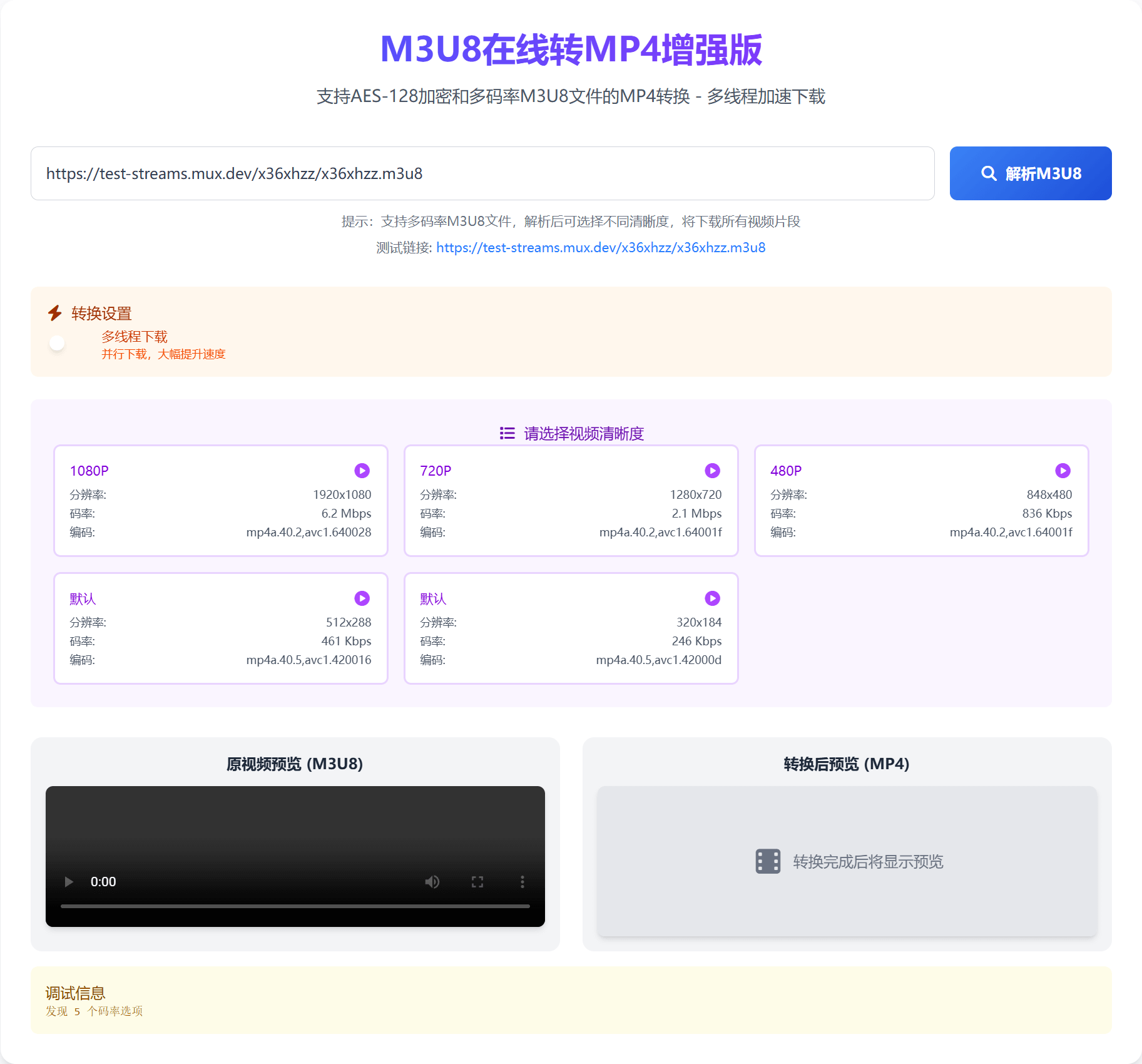
- Enable multi-threaded download and set the number of download threads (optional, default is single-threaded).
- Select video bitrate if the video source supports multiple bitrates.
- Click Start Conversion.
- After conversion is complete, click
Save.