
M3U8 to MP4 Failed? 2026 Complete Guide: Fix Black Screen, Encryption, Slow Download, and 403 Errors
I'm sure you've encountered this problem too: you finally downloaded an M3U8 streaming media file, fully confident to convert it to MP4—only to encounter errors, or a completed conversion that won't play. Staring at those "unplayable video files" on your computer, you're left with nothing but a sigh. Don't worry—what seems like a simple M3U8 to MP4 conversion process actually hides quite a few "tricks." Today, EZ Media Tools will thoroughly break down the common problems in this process and provide a set of solutions "from beginner to expert" to help you master video format conversion!
What is M3U8? Why Do We Need to Convert It?
Simply put, M3U8 is a video index file based on the HTTP Live Streaming (HLS) protocol. It isn't video content itself, but acts like a "playlist" that records the address list of countless small TS files (.ts) that make up each video segment. Here's an example M3U8 file:
#EXTM3U
#EXT-X-VERSION:3
#EXT-X-TARGETDURATION:10
#EXT-X-MEDIA-SEQUENCE:0
#EXT-X-PLAYLIST-TYPE:VOD
#EXTINF:10.0,
segment0.ts
#EXTINF:10.0,
segment1.ts
#EXTINF:10.0,
segment2.ts
#EXT-X-ENDLIST
Why Do Video Platforms Love Using M3U8?
- Strong Adaptability: Can dynamically switch between different quality levels based on user internet speed.
- Easy Caching: Small files are more favorable for progressive download and playback.
- Copyright Protection: To some extent, increases the difficulty of direct downloads.
Why Convert M3U8 to MP4?
- Universality: MP4 is a "universal format" supported by almost all devices, players, and editing software.
- Easy to Save and Manage: Single file, not easily lost, convenient to organize.
- Secondary Editing: Convenient for post-processing such as editing and compression.
Six Common Problems and Ultimate Solutions
"Troubleshooting" Quick Reference Table:
| Symptom Description | Possible Cause | Quick Solution |
|---|---|---|
| Downloaded M3U8 file is garbled or extremely small | Only downloaded the index file | Use tools like FFmpeg, M3u8-Downloader-GUI |
| "Cannot parse M3U8 URL" error | Unstable network, invalid M3U8 content | Switch to a stable network, check if M3U8 content is valid |
| Parse displays 403 | Server hotlink protection blocking | Use a tool with custom Referer support |
| Webpage crashes during conversion on iOS/Mac | Memory overflow | Use PC browser for tasks over 500MB |
| M3U8 file download or conversion extremely slow | Server rate limit or network issue, multi-threading not enabled | Switch network environment or enable multi-threaded download |
| Video is only a few KB | Only downloaded the index file | Use the M3U8 to MP4 tool provided by EZ Media Tools |
Problem 1: Downloaded M3U8 File is Just "Garbled" Text or Extremely Small
- Cause: You only downloaded the
.m3u8index file, not the actual.tssegments. - Solutions:
- Use professional download tools that can automatically parse M3U8 files and fetch all TS segments for merging, such as
FFmpeg,M3u8-Downloader,M3u8-Downloader-GUI, etc. - If you don't want to install software and prefer web-based conversion, try our site's M3U8 to MP4 Converter tool.
- Use professional download tools that can automatically parse M3U8 files and fetch all TS segments for merging, such as
Problem 2: Error When Parsing M3U8 File, "Cannot Parse M3U8 URL"
- Cause A: Unstable network, TS segment download failed.
- Solution: Try using a more stable network environment, or use a download tool that supports resume capability.
- Cause B: M3U8 link has expired or requires specific permissions.
- Solution: Check the validity of the M3U8 link and ensure you have access permissions.
- Cause C: The video stream is encrypted.
- Solution: Our site's
M3U8 to MP4 Onlinetool supports M3U8 files using AES-128 encryption. Other encryption methods are not currently supported. You can test playback using our site's M3U8 Player Online tool.
- Solution: Our site's
Problem 3: After Clicking to Parse M3U8 File, "403" is Displayed
Cause: M3U8 file access is restricted. Solution: This is typically because the video source has enabled cross-origin access restrictions. Try adding Referer information to the request headers, or use a proxy server.
Problem 4: Page Automatically Refreshes During Conversion on iOS/Mac Devices
Cause: This is due to mobile browser memory limitations (especially Safari). Converting a 1GB video may require 2GB of transient memory to process data fragments. Solutions:
- Light Tasks: Videos under 500MB can safely use mobile devices.
- Heavy Tasks: We strongly recommend switching to Chrome on Windows/Mac. Our site's tool leverages browser kernel multi-threading technology and supports conversion of super-large files up to 4GB on PC.
Problem 5: M3U8 File Download or Conversion is Extremely Slow
Causes:
- The other server has imposed download rate limits.
- Insufficient network bandwidth or unstable network.
- Multi-threaded download is not enabled during download.
Solution: Switch to a different network environment, or perform operations during off-peak hours, while enabling multi-threaded downloads. Our site's tool supports multi-threaded downloads, allowing you to customize the number of download threads based on your network environment.
Problem 6: Converted MP4 File is Only a Few KB and Completely Unplayable?
Cause: This happens because only the M3U8 index file (a plain text file) was saved, without actually downloading and merging the
.tsvideo segments. Many download managers treat the.m3u8file as the final target and stop there, never fetching the actual video data.Solutions:
- Use a dedicated M3U8 tool: Standard download software cannot parse M3U8 playlists. Use a tool that specifically supports HLS, such as M3U8 to MP4 Converter, which automatically fetches all
.tssegments and merges them into a single MP4. - Use FFmpeg: Run
ffmpeg -i "your-link.m3u8" -c copy output.mp4in your terminal. FFmpeg correctly reads the playlist and downloads every segment. - Verify the file: Open the "converted" file in a text editor. If it starts with
#EXTM3U, you only have the index file—not the video.
- Use a dedicated M3U8 tool: Standard download software cannot parse M3U8 playlists. Use a tool that specifically supports HLS, such as M3U8 to MP4 Converter, which automatically fetches all
Hands-on Guide: Step-by-Step M3U8 to MP4 Conversion Process
Using our site's M3U8 to MP4 tool as an example:
- Visit M3U8 to MP4 Converter.
- Enter the M3U8 URL and click Parse.
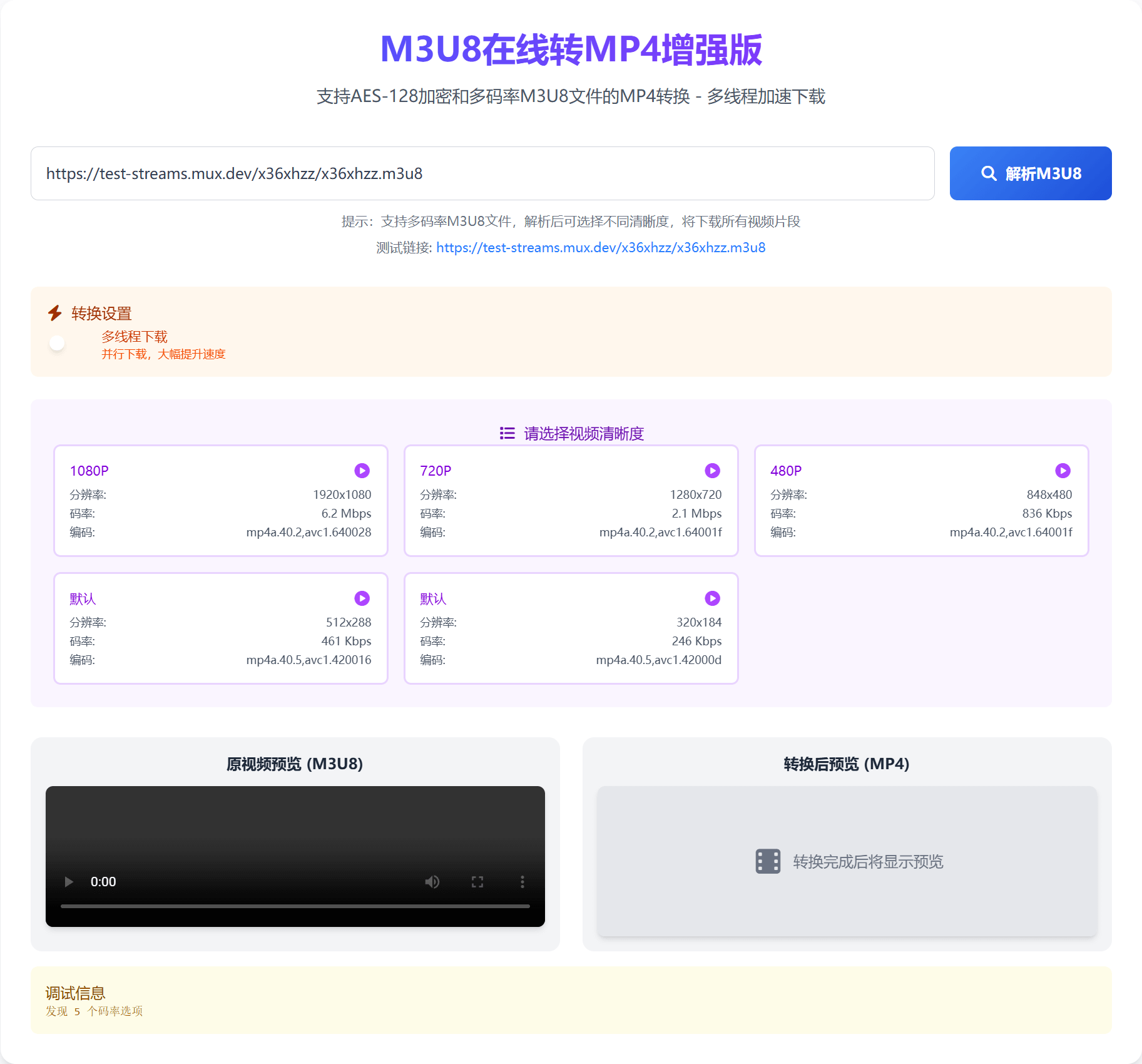
- Enable multi-threaded download and set the number of download threads (optional, default is single-threaded).
- Select video bitrate if the video source supports multiple bitrates.
- Click Start Conversion.
- After conversion is complete, click
Save.