
Mac/Win Universal Guide: How to Save Web M3U8 Video Streams as Local HD MP4
Author Introduction
👋 Hi, I'm the webmaster of EZ Media Tools, focusing on multimedia online video technology and browser-based tool development.
EZ Media Tools is a tool platform centered on online video processing, providing features including M3U8 online playback, M3U8 to MP4 conversion, RTMP/HLS stream testing, FFmpeg online transcoding, and more—all directly usable in browsers without installing clients.
Introduction: Have you ever felt helpless staring at m3u8?
I believe many people have had this experience: You see a wonderful video tutorial, a rare documentary, or a brilliant match replay on a webpage and want to save it to enjoy slowly or share with friends who don't have internet access. However, when you habitually right-click and choose "Save video as," you find there's no MP4 option at all; or you use download software like Xunlei or IDM, but only get back a .m3u8 file that's a few KB in size, and when you double-click to open it, you see a bunch of garbled text.
"What on earth is this thing?"
Don't panic—what you've encountered is exactly the video format most commonly used by mainstream video websites today—M3U8. Please note! It's not the video itself, but rather the video's "playlist."
Today, I'm bringing you a cross-platform, installation-free, purely online ultimate solution. We'll center around a magic tool—M3U8 to MP4 Converter—to walk you through step-by-step how to seamlessly merge these fragmented streaming media videos into a local HD MP4 file.
This article is over 2000 words, a nanny-level tutorial. I recommend bookmarking it before reading!
Why is M3U8 so difficult to handle?
Before we get hands-on, we must spend two minutes understanding why we can't directly download M3U8.
1. M3U8 = Video "Menu"
Imagine you're preparing a full Chinese banquet. The M3U8 file isn't the dishes themselves, but rather the menu. Inside it records:
- Where the cold dishes are (
segment001.ts) - Where the hot dishes are (
segment002.ts) - Where the soup is (
segment003.ts) - ......
When browsers play, they look at the menu (M3U8) and let the waiter (network) serve up the dishes (.ts video segments). Because the segments are small, you feel it's "instant on" without waiting for the entire video to download.
2. Why do ordinary downloaders fail?
Xunlei, IDM, and others are powerful, but they're quite "stupid." When they see M3U8, they think it's just a text file and download it, job done. They don't know they need to read this "menu" and then fetch back all the hundreds or thousands of .ts fragments before splicing them together.
3. Our Goal
What we need to do is find a "super chef," give them the menu (M3U8 link), have them automatically buy back all the dishes (TS segments), cook them (merge and transcode), and finally serve you a complete dish (MP4).
And M3U8 to MP4 Converter is precisely this super chef that doesn't charge.
Tool Core Advantages: Why Choose It?
There are many conversion tools on the market—why do I only recommend this one?
| Comparison Dimension | m3u8 to mp4 online tool | Browser Plugins | Desktop Software (like Xunlei) | Command Line (FFmpeg) |
|---|---|---|---|---|
| Platform | Mac/Win/Linux Universal | Depends on browser | Requires installation, version restrictions | All platforms, but high barrier |
| Installation | No installation required | Required | Required | Needs environment configuration |
| Cost | Completely free | Some charge/have ads | Often charge/have watermarks | Free |
| Operation Difficulty | ★☆☆☆☆ (Extremely simple) | ★★☆☆☆ | ★★★☆☆ | ★★★★★ (Hell level) |
| Quality | Supports original/1080P | Depends on luck | Often compresses quality | Original |
| Security | High (Pure browser processing, no upload of records) | High risk (needs to read webpage data) | Medium (may have bundles) | High |
| Conversion Speed | Supports multi-threading | Single-thread | Thread count 1-2 | Single-thread |
Conclusion: If you don't want to tinker with code, don't want malware, don't want to install a bunch of rogue software, m3u8 to mp4 online tool is your only true savior.
Practical Hands-On! Step-by-Step Guide to Completing Conversion
Next is the core of this article! Please open your browser, and let's start the operation.
Stage 1: The Most Critical Step—Capturing the M3U8 Link
Many tutorials die at this step because they don't clearly explain how to find the link. Don't worry, I'll break it down to kindergarten level.
Scenario 1: Using Chrome / Edge Browser
This is the most common scenario.
Open the video webpage, but don't play it yet.
Press
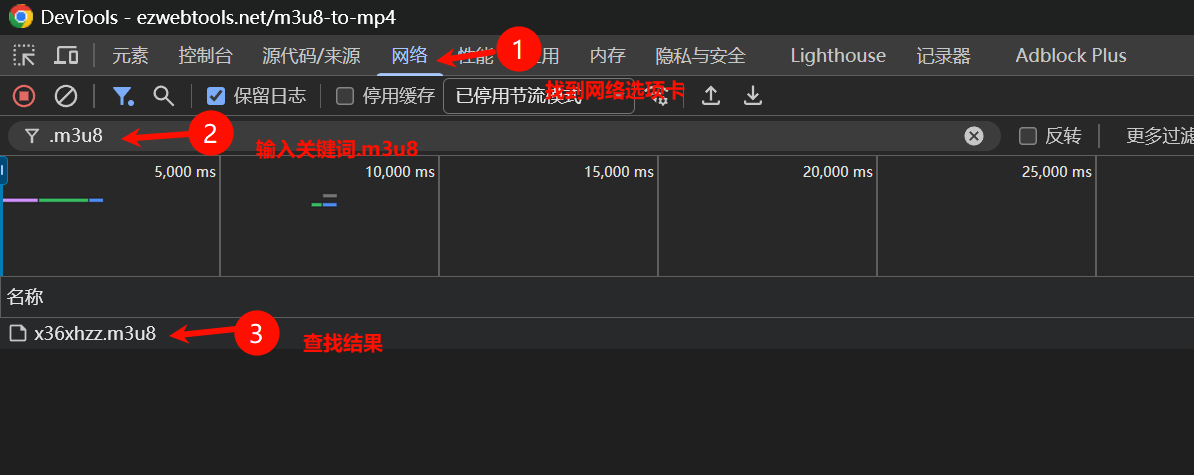
F12key on your keyboard or right-click → Inspect to open "Developer Tools."In the panel that pops up, click the Network (网络) tab at the top.
In the Filter (筛选) box below, enter:
m3u8Refresh the webpage (press F5). At this point, you'll see one or more files appear in the list.
How to choose?
- See
master.m3u8orplaylist.m3u8? Note it down first. - See
index_1080.m3u8orindex_720.m3u8? Choose this! The larger the number, the better the quality! - See a long string of garbled text +
.m3u8? Copy it!
- See
Right-click on that file → Copy → Copy link address (复制链接地址).
⚠️ Important Note: Links with parameter tokens or keys typically have time limits, usually only valid for 10-30 minutes. Go convert immediately after capturing the link, don't hesitate!
Scenario 2: Using Safari Browser (Mac Users)
Mac users have slightly more trouble, need to first enable the development menu.
- Open Safari Preferences → Advanced → Check "Show 'Develop' menu in menu bar".
- Open the video webpage, click Develop in the top menu bar → Show Web Inspector (shortcut
Option + Command + I). - Click the Network tab.
- Refresh the webpage, fill
m3u8in the search box. - Click the found m3u8 file, find URL in the right-side details, and copy it.
Stage 2: Call the Magic Tool—Start Conversion
Now you have a link in hand that looks like this:
https://cdn.example.com/video/720p/index.m3u8?token=xyz123
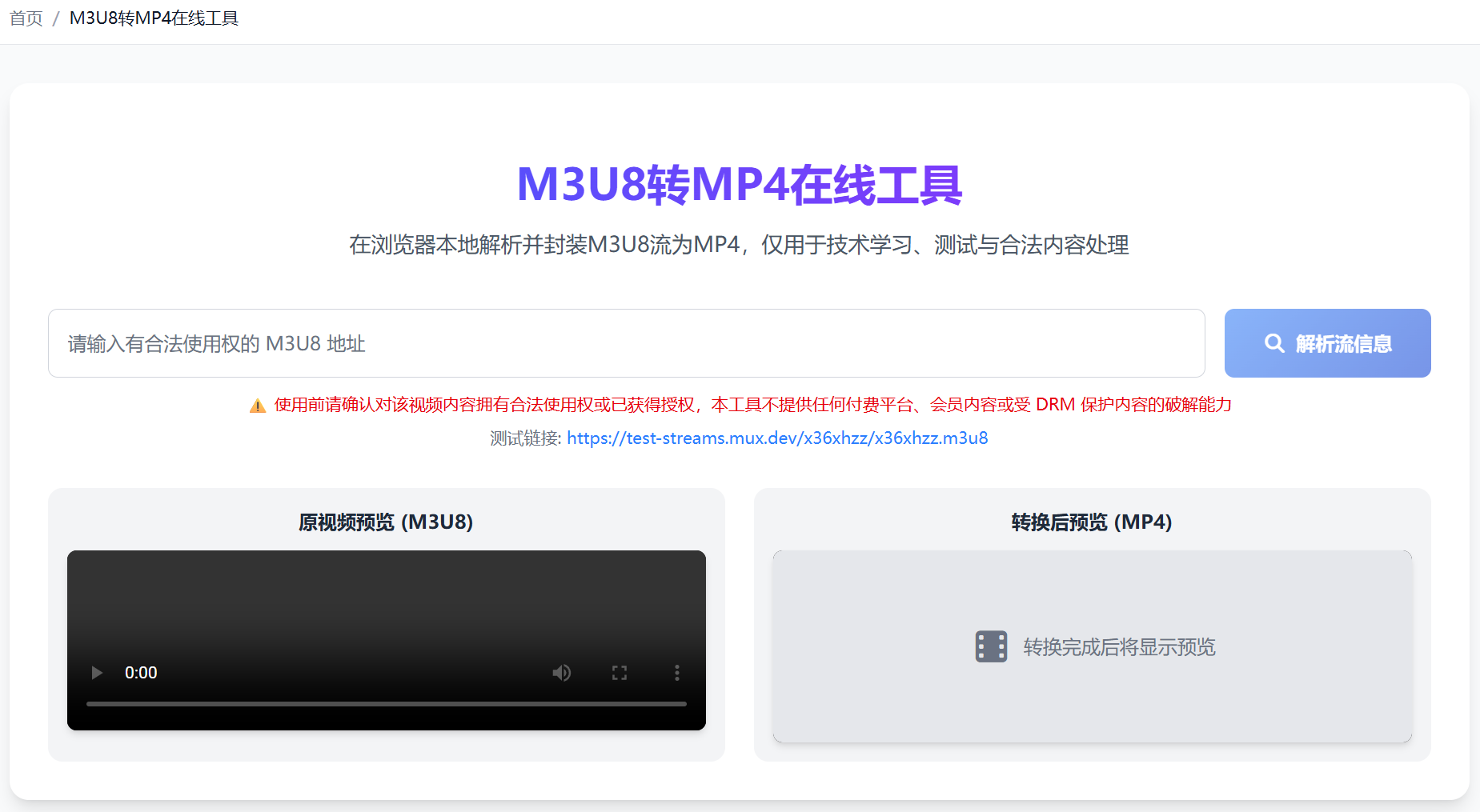
Open a new tab, visit: 👉 https://ezwebtools.net/m3u8-to-mp4
See that big input box in the middle? Paste the link you just copied into it.
Click the Parse Stream Info button on the right.
Stage 3: Patiently Wait—Witness the Miracle
After clicking the button, the webpage will display all video quality options for you to choose from. I recommend choosing high quality. Please note! Not all m3u8 links support multiple quality levels.
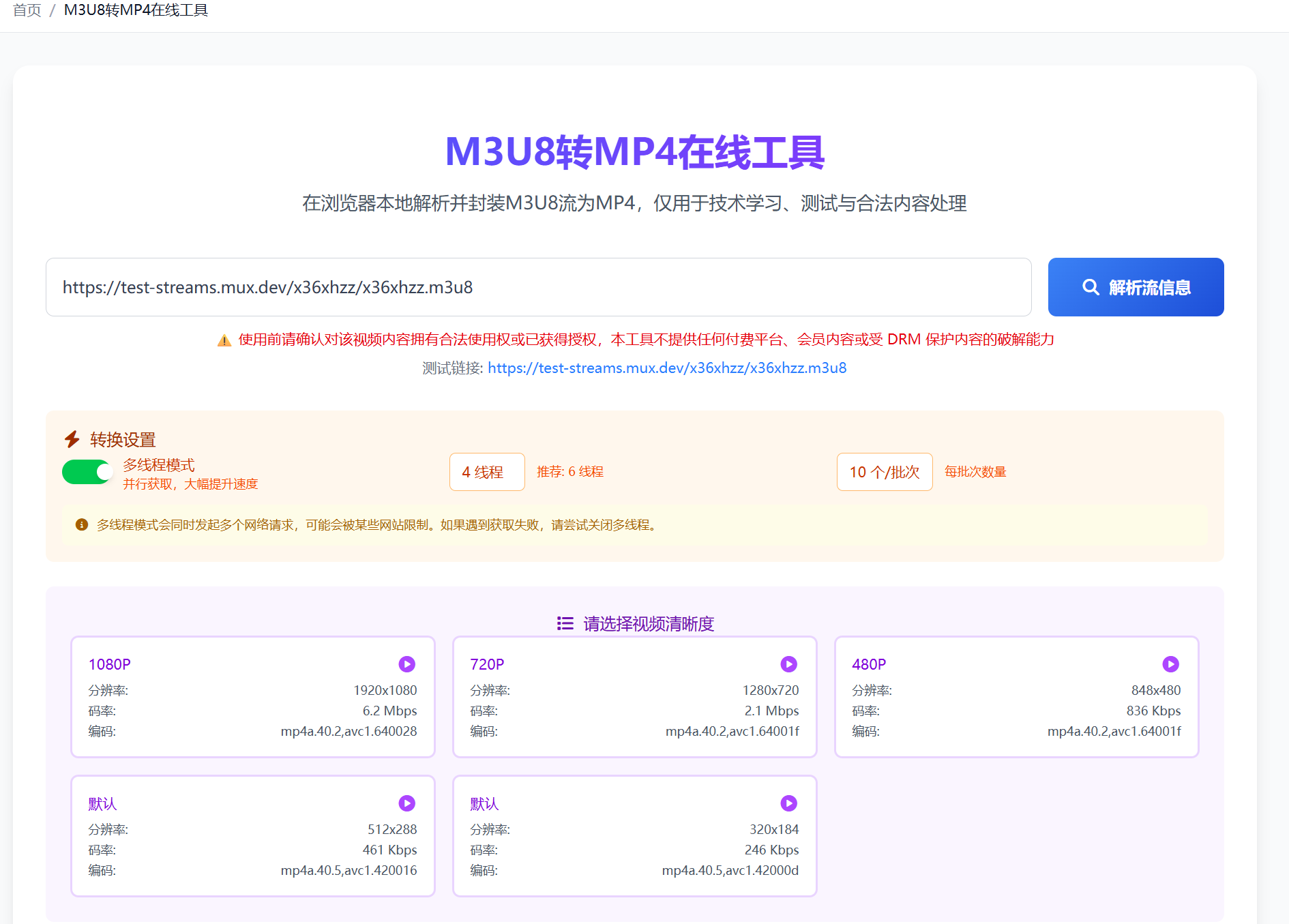
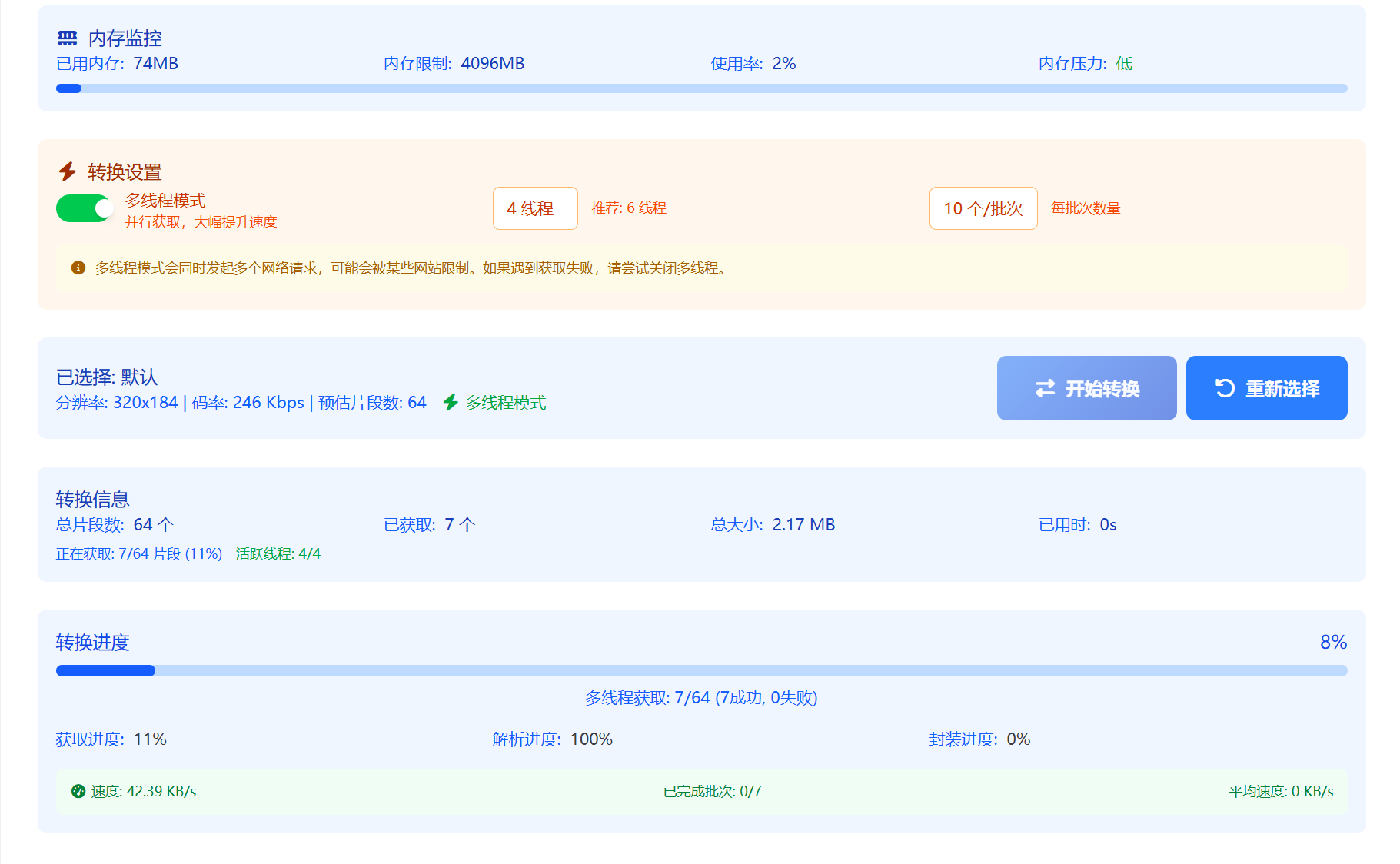
After selecting quality, click Start Conversion. What's happening in the background?
- The browser is accessing your link.
- Hundreds of small
.tssegments are being downloaded to the browser's local cache. - These fragments are being losslessly spliced into a large
.mp4.
How long will it take?
- If it's a short video of a few minutes, 10-30 seconds is fine.
- If it's a 1-hour 1080P course, it may take 3-5 minutes. Speed depends on your network environment.
- Please keep the page open!
Stage 4: Save Conversion Results
When the progress bar completes, a green Save button will appear on the page!
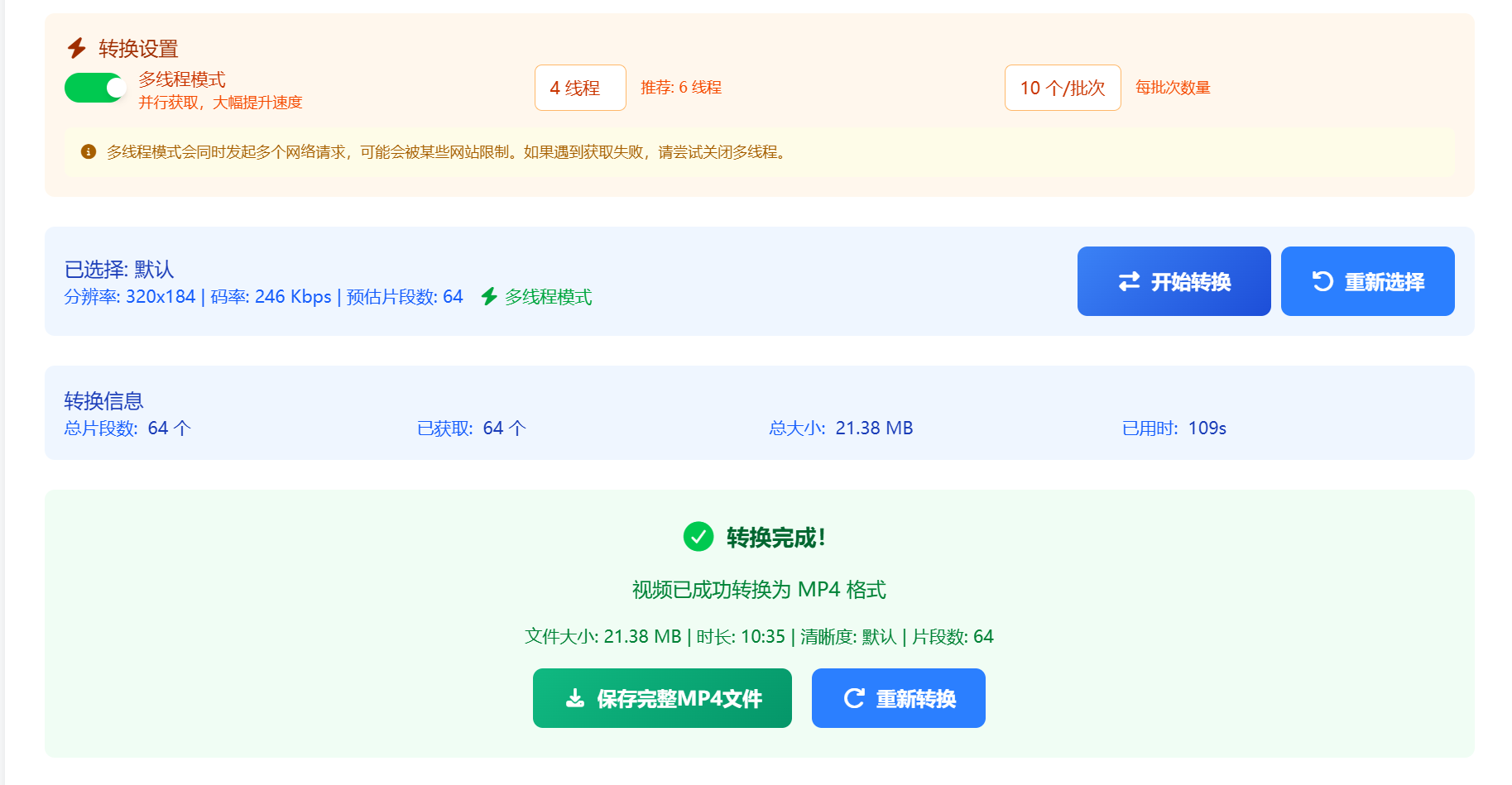
Click it! The browser will save that HD MP4 file you've been dreaming of!
Advanced Tips and Common Issues (FAQ)
Q1: Processing is slow, how to speed it up?
A: You can enable multi-process mode for parallel fetching, which can significantly improve speed. Note: Multi-threading mode will initiate multiple network requests simultaneously and may be restricted by some websites. If you encounter fetch failures, try disabling multi-threading.
Q2: Shows "Error: Failed to fetch" or conversion failed?
A: 90% of the time it's an expired link. Tokens in M3U8 links have time limits—use it immediately after capturing! If it still doesn't work, try opening the video in incognito mode to capture the link, excluding plugin interference.
Q3: Can it handle 4K quality?
A: Yes! As long as the source website provides 4K m3u8 segments, it can convert at original quality. However, file size will be very large, so ensure sufficient disk space.
Q4: Is this website safe? Is there a risk of privacy leakage?
A: Very safe. All downloading and conversion runs entirely inside your browser using WebAssembly (WASM) technology — no video data is ever uploaded to any server. Your computer does all the processing locally, and the final MP4 file is saved directly to your device. No account or login is required.
Q5: Why can't some M3U8 addresses be converted?
A: Some M3U8 streams may have access control, encryption, or DRM protection mechanisms. These resources are typically used for copyright protection purposes and cannot be processed by the tool.
Compared to Other Solutions, Why Do I Still Recommend It?
To prove I'm not blindly promoting, let's quickly compare the pain points of other solutions.
1. CAT (Capture And Convert) Plugin
It was very popular before, but now it doesn't work well. It often shows "cross-origin error," and configuration is complex, leaving newbies completely confused.
2. Xunlei
Xunlei's support for M3U8 is quite mysterious now. Sometimes it can download, sometimes it downloads a file that's a few KB. Plus, Xunlei limits speed—if you don't buy a membership, a 1G video will take half a day.
3. FFmpeg Command Line (Geeks Only)
If you're a programmer, you'll use this command: ffmpeg -i "your-link.m3u8" -c copy -bsf:a aac_adtstoasc output.mp4 This is indeed the strongest, fastest, and doesn't lose quality. However! You need to configure environment variables, know how to use black terminal windows, and handle various errors. Is it worth spending an hour tinkering with environment just to download a video?
Summary and Copyright Notice
Alright, the tutorial ends here. Let's review:
- Principle: m3u8 is a playlist, ts are fragments, and we need to glue the fragments together.
- Find link: F12 → Network → Search m3u8 → Copy link (with parameters!).
- Convert: Open ezwebtools → Paste → Convert → Save MP4.
Once you master this workflow, whether Mac or Windows, whether Chrome or Edge, 95% of streaming media videos across the internet can be "packed away" by you.
⚠️ Final final note: About copyright
Technology is neutral, but people who use technology have a stance. Please use this method for personal learning, offline viewing, and data backup. Strictly prohibit using downloaded videos for secondary editing and publication, or selling for profit. Only by respecting creators' labor achievements can more high-quality content survive and thrive.